Create A DR Instance
DisasterInstance is the main protected application object. It defines the namespaces, selectors, standby behavior, and restore policy.
This page explains the fields through a real console flow. The example values are listed below. Some screenshots may show current demo names such as disaster-basic-... or test-nginx-...; use the same fields with your own DR configuration and namespace.
| Item | Example |
|---|---|
| DR instance | docs-walkthrough-20260511 |
| DR configuration | dc01 |
| Source cluster | ip170-test-001 |
| Target cluster | cluster-ip171-1774332463 |
| Protected namespace | dr-pvc-src-170 |
| Workload mode | replica |
Open The Instance List
Open DR Management / Instance Configuration.
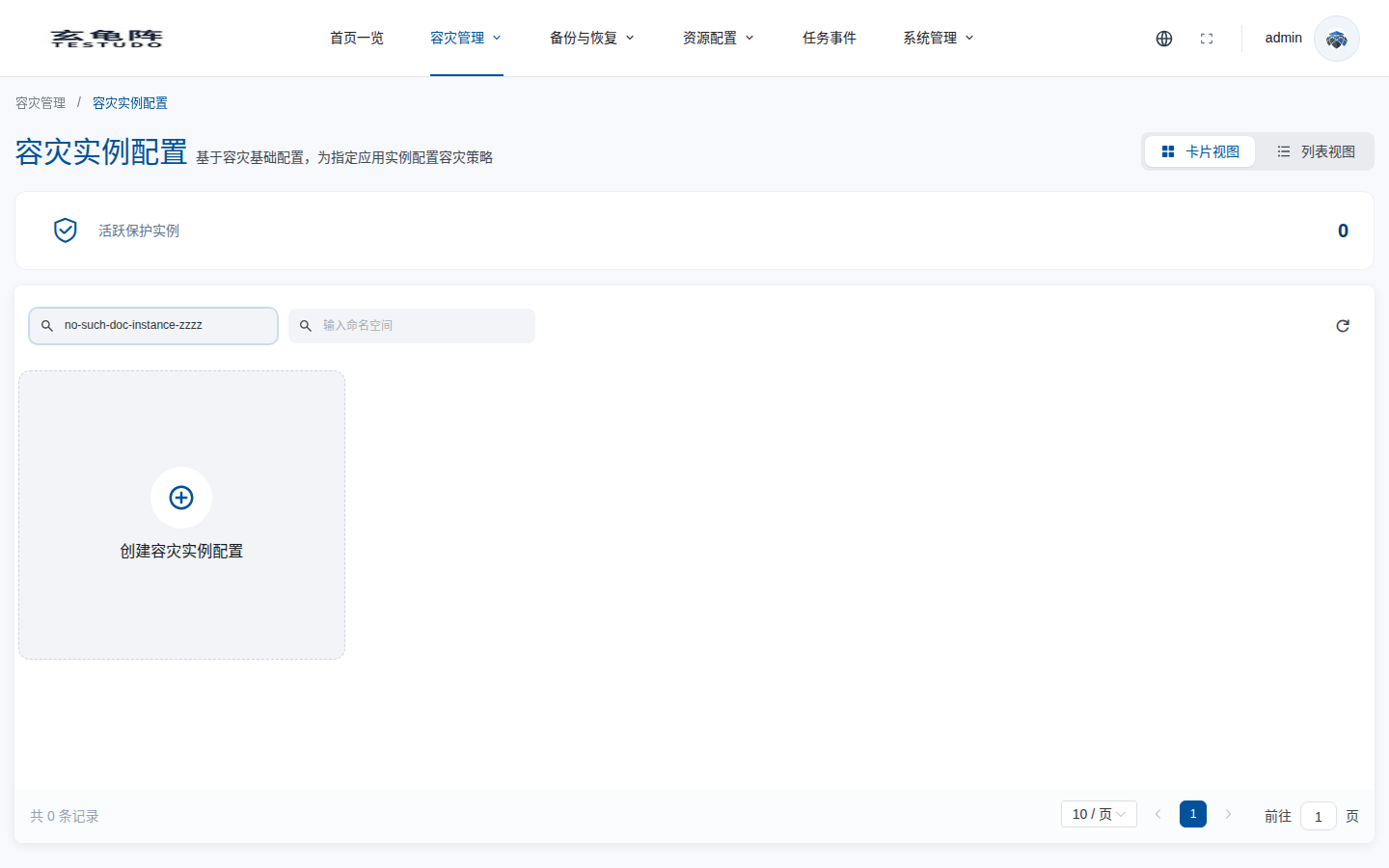
The list page contains these modules:
- Name: the instance name is clickable and opens the instance detail page.
- Description label: the text entered in the create form.
- DR configuration: the referenced
DisasterConfig. - Application scope: protected namespaces.
- Workload: the restore mode. The current UI provides
replica. - Status: derived from
status.fsmState.Protectedis shown as protected in the UI. - Actions: pause/resume in the list; failover, failback, and reprotect in the detail page.
Fill Basic Fields
Click Create DR Instance Configuration, then enter the name, description, and DR configuration.
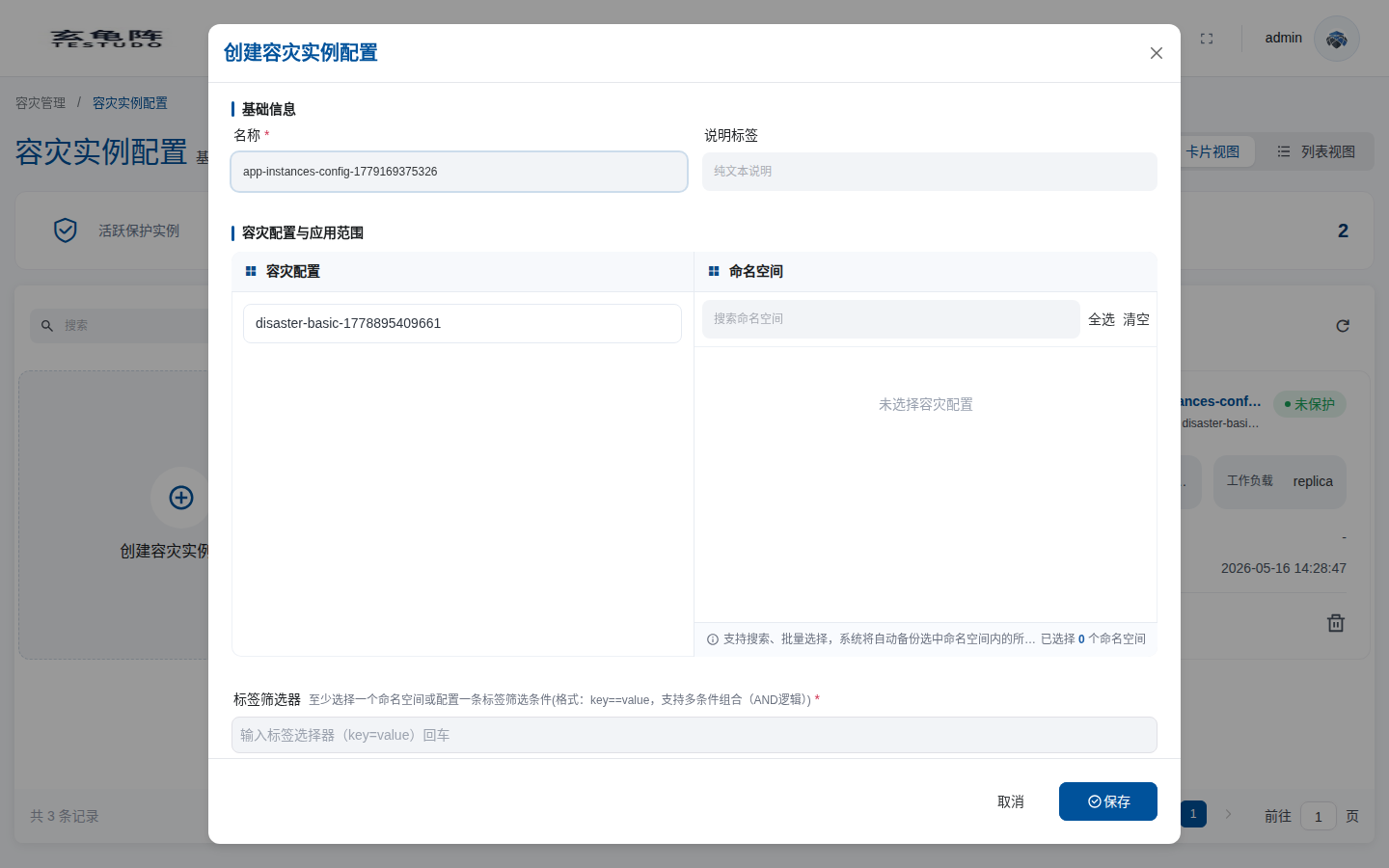
The create modal has four sections:
- Basic information: instance name and description label.
- DR configuration: select a Ready
DisasterConfig. Selectingdc01loads namespaces from the source cluster. - Application scope: namespaces, label selectors, and workload type.
- Advanced options: StorageClass mapping, Resource Policies, resource modifiers, and bulk modifications.
Select Application Scope
The namespace list comes from source-cluster workloadNamespaceStats; not every namespace is shown. When creating a DR instance, the console only shows namespaces that contain a running Deployment or StatefulSet application:
- Deployment:
readyReplicas > 0oravailableReplicas > 0. - StatefulSet:
readyReplicas > 0.
In other words, application-level DR currently protects Deployment and StatefulSet applications. Services, Ingresses, ConfigMaps, Secrets, PVCs, and other supporting resources are synchronized and restored with the application. Namespaces that only contain bare Pods, DaemonSets, Jobs, or CronJobs are not shown as selectable protected application scopes. The screenshot selects test-nginx-2 and shows 4 resources; in your walkthrough, select your business namespace, for example dr-pvc-src-170.
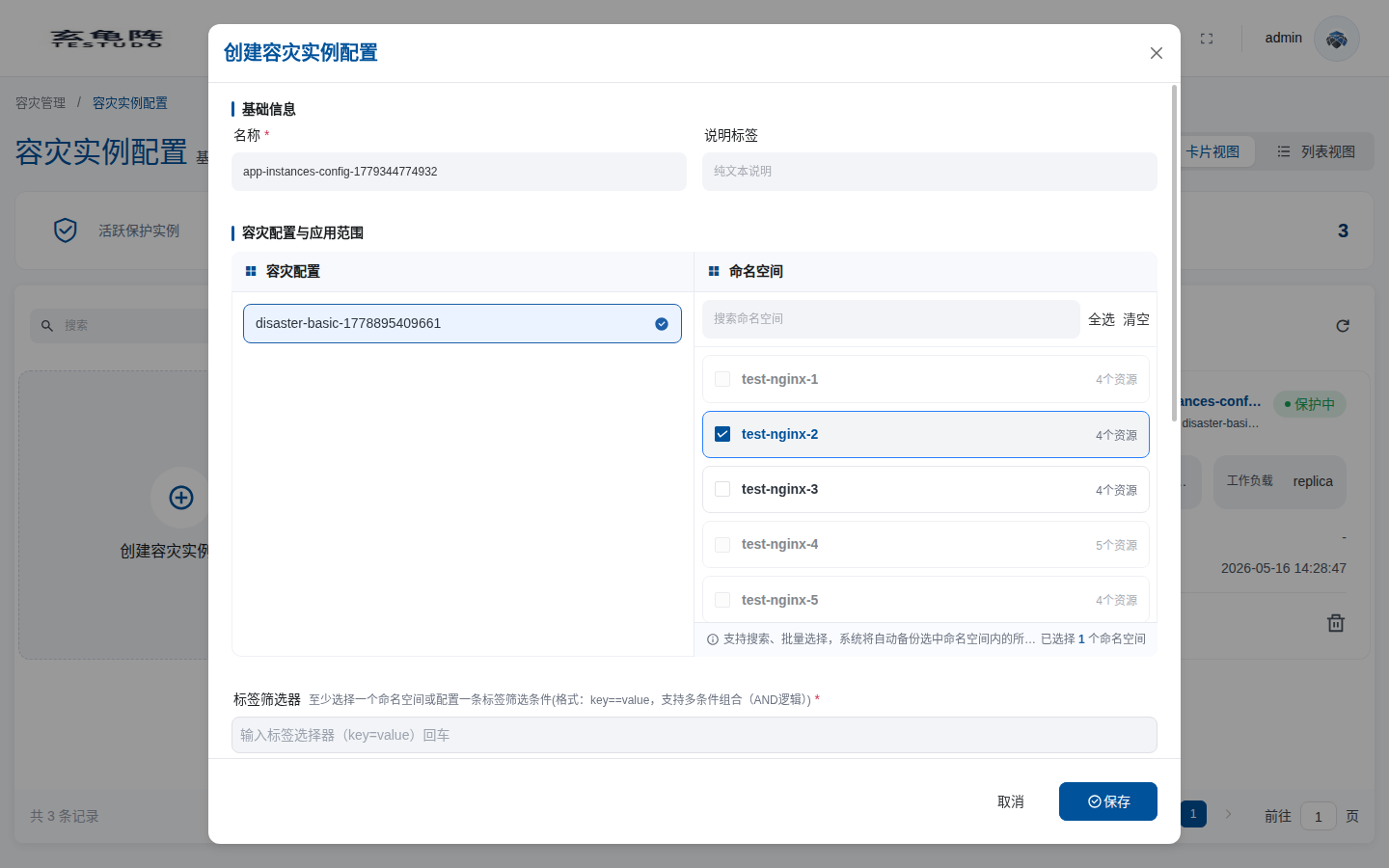
| Field | Meaning |
|---|---|
| Namespace | Protected application namespace. The console only shows namespaces that have a running Deployment/StatefulSet application. Select at least one namespace or provide a label selector. |
| Label selector | key=value filters for resources inside the selected scope. |
| Workload type | replica keeps target-side workloads in standby. |
Configure Advanced Options
Open Advanced options when source and target clusters differ in storage classes, ingress classes, or resource structure.
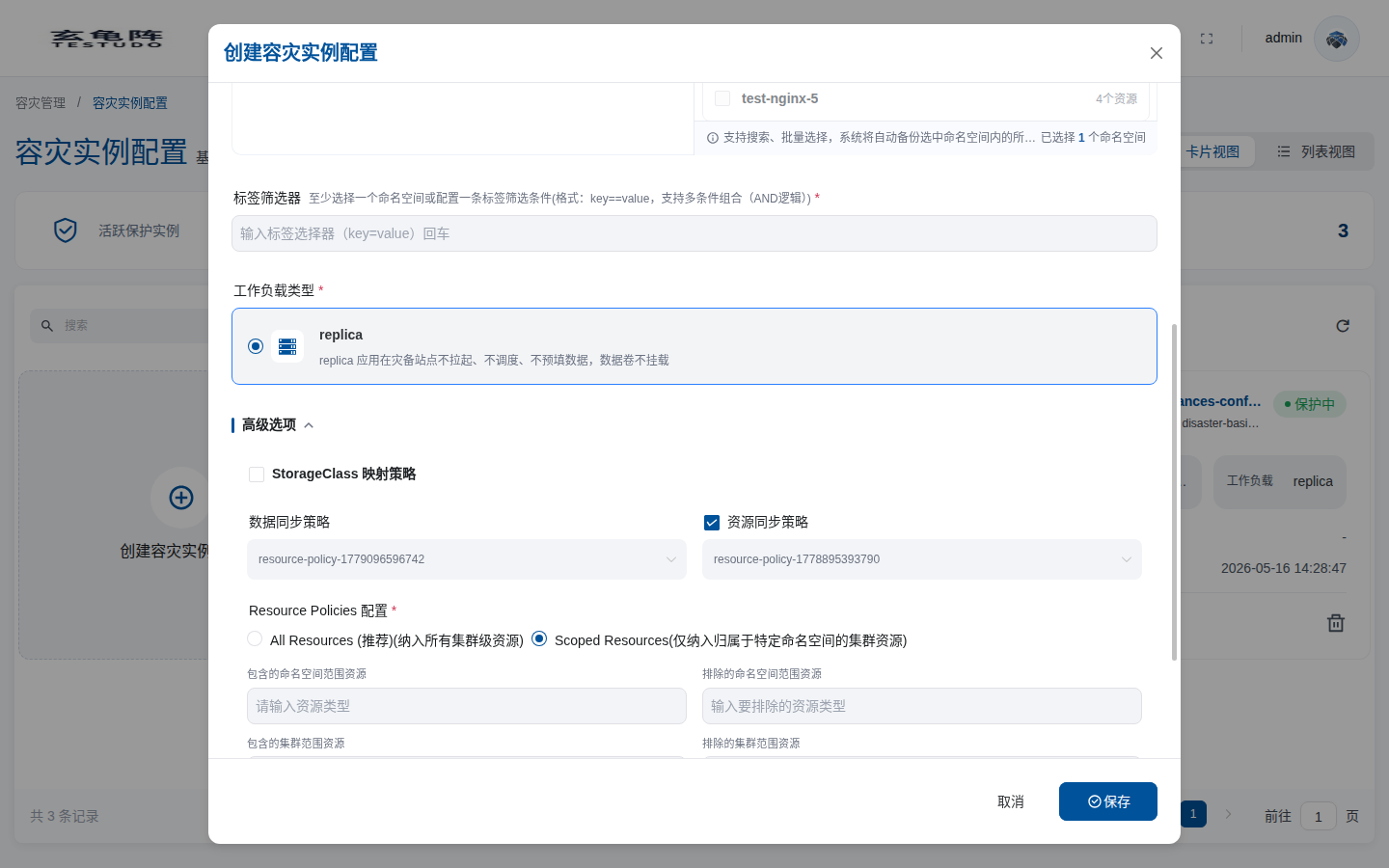
Advanced options are a scrollable form. The top section contains StorageClass mapping and instance-level sync policy overrides. Scroll further to configure Resource Policies:
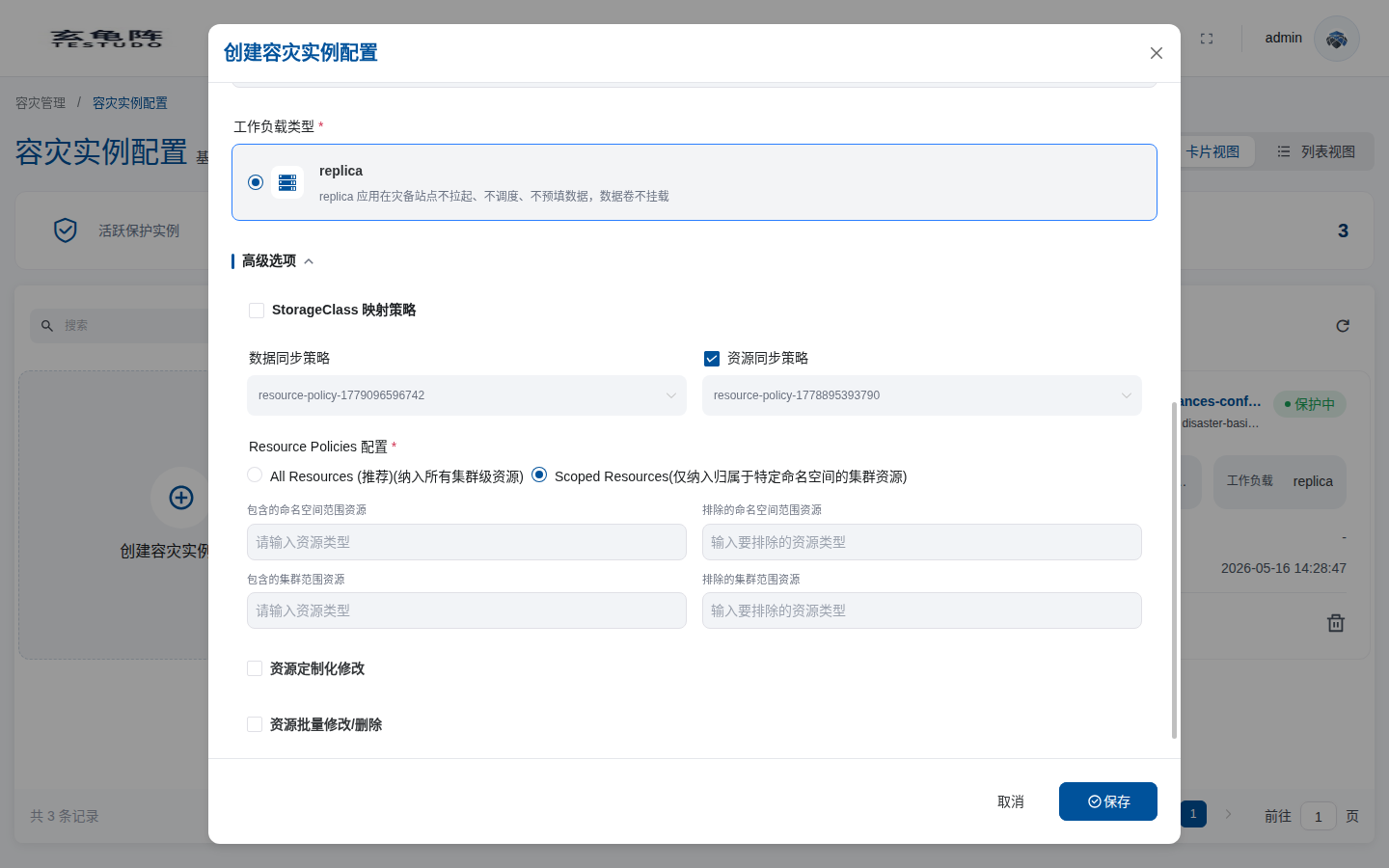
Advanced options are persisted to DisasterInstance.spec. They are not just UI-only settings. After the instance is saved, the operator reads these fields when it creates DataSync, ResourceSync, and AppRestore objects.
| Module | Field | Purpose |
|---|---|---|
| StorageClass mapping | spec.restorePolicy.storageClassMapping | Enable and configure mappings when source PVC StorageClasses differ from target StorageClasses. The target cluster still needs the target StorageClass/provisioner. |
| Data sync policy | spec.dataSyncPolicy | Override the data sync policy from the DR configuration. Leave empty to inherit from DisasterConfig. |
| Resource sync policy | spec.resourceSyncPolicy | Override the resource sync policy from the DR configuration. Leave empty to inherit from DisasterConfig. |
| Resource Policies / fine-grained resource control | spec.restorePolicy.resourceSelection | Include or exclude namespaces, resource kinds, and cluster-scoped resources. |
| Resource custom modifications | spec.restorePolicy.modifierRulesText / spec.restorePolicy.modifierRules | Enable this option and upload or enter JSON rules for precise restore-time field changes. See Resource Customization And Bulk Changes. |
| Bulk modifications/deletions | spec.restorePolicy.bulkModifierActionsText / spec.restorePolicy.bulkModifierActions | Enable this option to generate batch changes or removals, such as removing labels, annotations, or node selectors. See Resource Customization And Bulk Changes. |
The current instance create form does not expose a dedicated IngressClass mapping field. Use Resource custom modifications or Bulk modifications/deletions for IngressClass, image-prefix rewrite, node selector, annotation, and other environment-specific changes. For high-churn image tags, prefer bulkModifierActions[].action=rewriteImage instead of a full-image exact replacement.
Label Selector Expressions
The label selector expressions field in advanced options writes Kubernetes LabelSelector.matchExpressions. Use it when plain key=value selectors are not enough, for example when you need to exclude specific label values, require a label to exist, or require a label to be absent.
The plain label selector writes:
DisasterInstance.spec.labelSelector.matchLabels
The expression field writes:
DisasterInstance.spec.labelSelector.matchExpressions
The console field accepts a JSON array. Leave it empty or enter [] when no expression is needed.
[
  {
    "key": "app",
    "operator": "NotIn",
    "values": ["debug", "test"]
  },
  {
    "key": "backup-disabled",
    "operator": "DoesNotExist"
  }
]
This example selects resources whose app label is not debug or test, and that do not have the backup-disabled label.
Each matchExpressions item has these fields:
| Field | Required | Meaning |
|---|---|---|
key | Yes | Label key, such as app, tier, or backup-disabled. |
operator | Yes | Matching operator. Supported values are In, NotIn, Exists, and DoesNotExist. |
values | Depends on operator | In and NotIn require a non-empty array. Exists and DoesNotExist must omit it or use an empty array. |
Operator behavior:
| operator | Example | Match rule |
|---|---|---|
In | { "key": "app", "operator": "In", "values": ["web", "api"] } | The resource has the app label and its value is web or api. |
NotIn | { "key": "env", "operator": "NotIn", "values": ["test"] } | The resource has no env label, or its env value is not test. |
Exists | { "key": "app", "operator": "Exists" } | The resource has the app label, regardless of value. |
DoesNotExist | { "key": "backup-disabled", "operator": "DoesNotExist" } | The resource does not have the backup-disabled label. |
When both plain label selectors and label selector expressions are configured, both apply with AND semantics. The following selector requires tier=backend, excludes app=debug, and excludes resources with the backup-disabled label:
labelSelector:
  matchLabels:
    tier: backend
  matchExpressions:
    - key: app
      operator: NotIn
      values:
        - debug
    - key: backup-disabled
      operator: DoesNotExist
Notes:
- The field must contain valid JSON. Property names and string values must use double quotes.
- Enter an array only. Do not wrap it as
{ "matchExpressions": ... }. - Multiple expressions are combined with AND semantics. A single
labelSelectordoes not express OR. - The label selector still narrows the selected namespace scope. Prefer selecting the business namespace first, then use expressions to exclude test, temporary, or unprotected resources.
- With
NotIn, resources without that label also match. If the label must exist and its value must not be one of several values, add anExistsexpression for the same key.
Sync Policy Override
The DR configuration normally provides default sync policies:
DisasterConfig.spec.dataSyncPolicy
DisasterConfig.spec.resourceSyncPolicy
The instance can override each field independently:
DisasterInstance.spec.dataSyncPolicy
DisasterInstance.spec.resourceSyncPolicy
The effective rule is instance first, config as fallback:
| Instance field | Config field | Effective result |
|---|---|---|
| Empty | Set | Uses the config policy |
| Set | Set | Uses the instance policy |
Only dataSyncPolicy is overridden | resourceSyncPolicy still inherited | Data sync uses the instance policy; resource sync uses the config policy |
Only resourceSyncPolicy is overridden | dataSyncPolicy still inherited | Resource sync uses the instance policy; data sync uses the config policy |
The detail and list APIs echo the resolved values:
{
  "effectiveDataSyncPolicy": "policy-data-fast",
  "effectiveResourceSyncPolicy": "policy-resource-normal",
  "dataSyncPolicySource": "instance",
  "resourceSyncPolicySource": "config"
}
The operator writes the effective cron schedule into DataSync.spec.trigger.schedule and ResourceSync.spec.trigger.schedule. If a policy is disabled or has no usable schedule, the corresponding schedule is cleared.
Fine-Grained Resource Control
Fine-grained resource control lives under:
spec.restorePolicy.resourceSelection
There are two groups of fields.
Legacy fields:
includedResources: []
excludedResources: []
includeClusterResources: true | false
Scoped fields:
includedNamespaceScopedResources: []
excludedNamespaceScopedResources: []
includedClusterScopedResources: []
excludedClusterScopedResources: []
For new configurations, prefer the scoped fields. They avoid the broad behavior of includeClusterResources=true. Through the server/API path, once scoped fields are provided, the request is saved as scoped mode; do not mix includeClusterResources=true with scoped fields to express the same intent.
| Field | Meaning |
|---|---|
includedNamespaceScopedResources | Restore only selected namespace-scoped kinds, such as deployments.apps, services, or configmaps. |
excludedNamespaceScopedResources | Exclude selected namespace-scoped kinds. |
includedClusterScopedResources | Explicitly restore selected cluster-scoped kinds, such as storageclasses.storage.k8s.io or clusterroles.rbac.authorization.k8s.io. |
excludedClusterScopedResources | Exclude selected cluster-scoped kinds. |
includedNamespaces / excludedNamespaces | Override or refine the instance namespace scope. |
labelSelector | Override the instance label selector for this restore policy. |
The include and exclude lists in the same group must not conflict. For example, the same kind cannot appear in both includedNamespaceScopedResources and excludedNamespaceScopedResources; * also cannot be combined with the opposite list.
When creating or updating a disaster instance through the server API, these four fields live under restorePolicy.resourceSelection:
{
  "name": "bookinfo-dr",
  "config": "bookinfo-config",
  "namespaces": ["demo-bookinfo"],
  "restorePolicy": {
    "resourceSelection": {
      "includedNamespaceScopedResources": [
        "deployments.apps",
        "statefulsets.apps",
        "services",
        "configmaps",
        "secrets"
      ],
      "excludedNamespaceScopedResources": ["events", "pods", "replicasets.apps"],
      "includedClusterScopedResources": [],
      "excludedClusterScopedResources": [
        "storageclasses.storage.k8s.io",
        "ingressclasses.networking.k8s.io"
      ]
    }
  }
}
The field values are string arrays. Use Kubernetes API resource names, preferably the NAME column from kubectl api-resources; do not pass a comma-separated string such as "deployments,services".
DataSync And ResourceSync Boundaries
Fine-grained resource control affects restore paths, but the two sync paths have different responsibilities:
| Path | Main responsibility | Fixed boundary |
|---|---|---|
| DataSync | Restore PVC/PV data through Trafficless Restore | Mainly handles pods, persistentvolumeclaims, and persistentvolumes |
| ResourceSync | Restore the Kubernetes resource skeleton for standby | Always excludes pods, persistentvolumeclaims, and persistentvolumes to avoid overlapping with DataSync |
Even if a broad resource scope is configured, ResourceSync adds back the mandatory exclusions for pods/persistentvolumeclaims/persistentvolumes. PVC/PV data belongs to DataSync.
Why Cluster-Scoped Resources Add One More Restore
When scoped mode is used and includedClusterScopedResources is not empty, ResourceSync splits one sync round into two restore phases:
ResourceSync AppBackup
  -> Cluster Restore phase
  -> Namespace Restore phase
This is intentional. Velero restore fields do not provide the same scoped model for cluster-scoped and namespace-scoped resources, so the operator separates them to avoid pulling cluster-scoped resources into the namespace restore by side effect.
| Phase | Trigger | Purpose | AppRestore name pattern |
|---|---|---|---|
| Cluster phase | includedClusterScopedResources is not empty | Restore only explicit cluster-scoped resources with includeClusterResources=true and existingResourcePolicy=None | rec-rs-...-cluster |
| Namespace phase | Default in scoped mode | Restore namespace-scoped resources with includeClusterResources=false, existingResourcePolicy=Update, and pods/pvc/pv excluded | rec-rs-...-ns |
So one ResourceSync run can create two AppRestore objects when cluster-scoped resources are explicitly included. This is expected, not a duplicate failure. ResourceSync.status records:
lastClusterRestoreName
clusterRestoreStatus
lastNamespaceRestoreName
namespaceRestoreStatus
If only excludedClusterScopedResources is set and includedClusterScopedResources is empty, ResourceSync does not start the cluster phase. The system avoids implicitly restoring cluster-scoped resources.
Recommended Settings
| Scenario | Recommendation |
|---|---|
| Normal application DR | Do not include cluster-scoped resources. Configure namespaces, required StorageClass mappings, and any required IngressClass/image/node customization rules only. |
| Restore only selected resource kinds | Use includedNamespaceScopedResources, for example Deployment, Service, ConfigMap, and Secret. |
| CRDs, StorageClasses, and RBAC already exist on target | Manage them through platform installation, not through per-instance restore. |
| A few cluster-scoped resources must travel with the instance | Set only the required includedClusterScopedResources and expect an extra ResourceSync cluster restore phase. |
| Different RPO/RTO is required | Override dataSyncPolicy or resourceSyncPolicy on the instance instead of changing the shared DR config. |
Important Fields
| Field | Meaning |
|---|---|
| DR configuration | Source, target, repository, and sync policies |
| Namespaces | Protected application namespaces |
| Label selector | Optional resource scope within namespaces |
| Pod restore method | The walkthrough uses replica for target standby behavior |
| Restore policy | Namespace mapping, StorageClass mapping, and modifiers |
Wait For Protected
After saving, the instance enters initialization. The operator creates DataSync and ResourceSync and waits for both first syncs to finish.
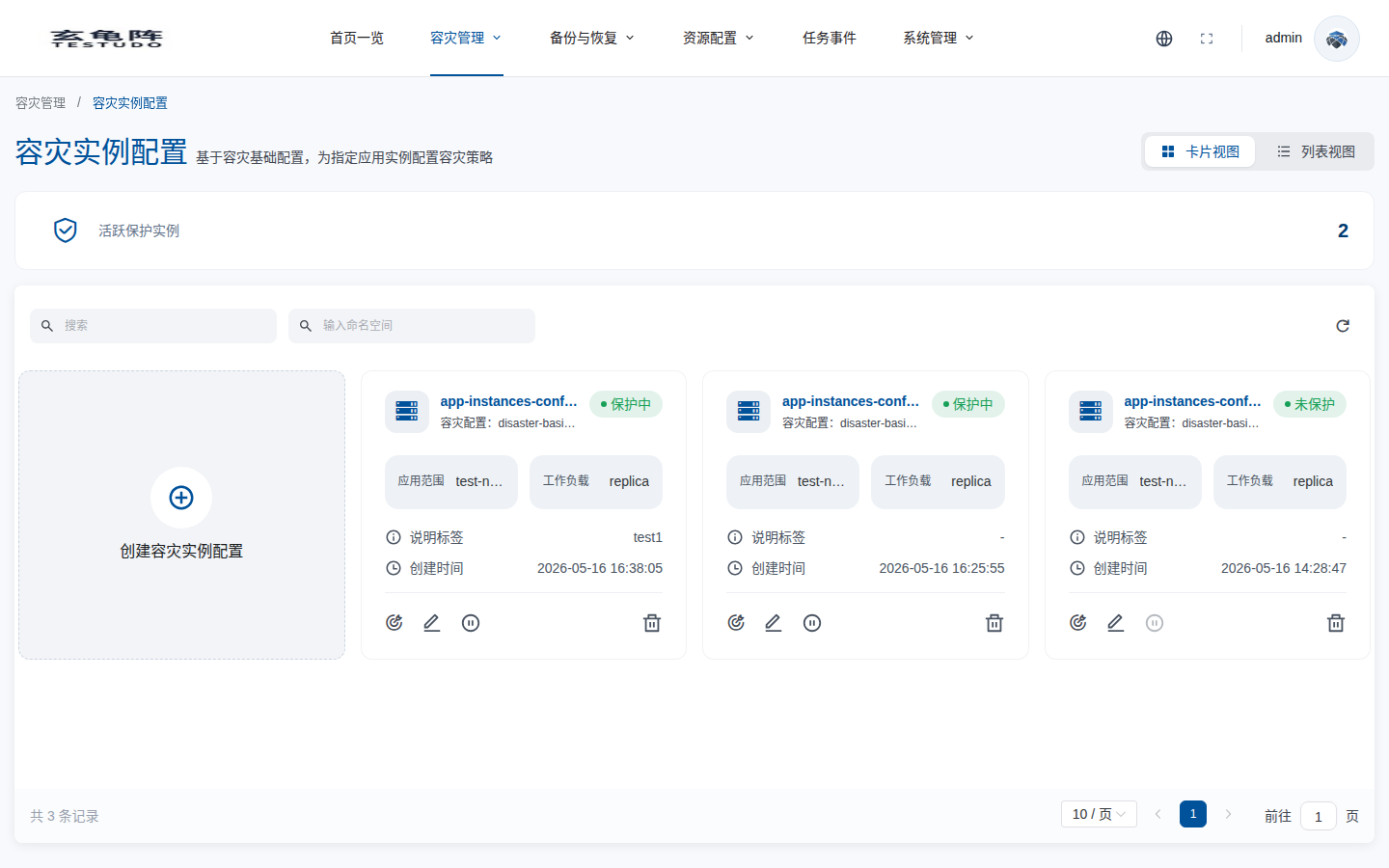
The detail API returned:
{
  "fsmState": "Protected",
  "primaryCluster": "ip170-test-001",
  "secondaryCluster": "cluster-ip171-1774332463",
  "availableOperations": ["failover", "pause", "synconce", "syncdata", "syncresource"]
}
Useful endpoints:
GET /apis/disasterinstances.testudo.softcdata.com/v1/instances/:nameGET /apis/disasterinstances.testudo.softcdata.com/v1/instances/:name/sync-status
Verify
kubectl -n disaster-system get disasterinstance docs-walkthrough-20260511
kubectl -n disaster-system get datasync,resourcesync
kubectl -n disaster-system describe datasync dr-ds-docs-walkthrough-20260511
kubectl -n disaster-system describe resourcesync dr-rs-docs-walkthrough-20260511
Wait for Protected before production failover.