DR Velero Hooks
Velero hooks let application containers run custom commands during backup or restore. Common uses include database quiesce and resume, cache flushing, post-restore initialization, restore markers, and application reload actions.
Testudo does not implement a custom hook executor. It accepts, validates, stores, and projects native Velero hook structures. Velero still performs the actual execution.
Hooks execute commands inside application Pods or restored Pods. Before using them in production, validate idempotency, timeout behavior, failure handling, and data consistency in a test namespace.
Supported Scope
| Scenario | Input field | Projection target | Hook execution |
|---|---|---|---|
| Manual application backup | hooks | AppBackup.spec.template.hooks -> Velero Backup.spec.hooks or Schedule.spec.template.hooks | Yes |
| Manual application restore | hooks | AppRestore.spec.template.hooks -> Velero Restore.spec.hooks | Yes |
| DR instance data backup | spec.veleroHooks.dataBackup | AppBackup created by DataSync | Yes |
| DR instance data restore | spec.veleroHooks.dataRestore | AppRestore created by DataSync | Yes; exec post hooks are adapted for Trafficless restore |
| DR resource sync | spec.veleroHooks exists | AppBackup/AppRestore created by ResourceSync | Not projected |
| DR drill data restore | DisasterDrill.spec.veleroHooks.dataRestore | AppRestore created for drill data restore | Yes |
| DR drill data backup | DisasterDrill.spec.veleroHooks.dataBackup | Unsupported | Rejected by the server |
Prerequisites
Before enabling hooks:
- Velero is installed and the
BackupStorageLocationis available. - The namespace, label selector, and resource scope match the Pods that should run hooks.
- The target container image contains the script or shell used by the hook command.
- If the command writes to a PVC path such as
/data/hook.log, that path is mounted in the container. - Sensitive values are passed through existing Secret env vars,
envFrom.secretRef, or mounted files, not as plaintext command arguments.
Console Entry Points
AppBackup Hooks
Open Backup & Restore / App Backup, then create or edit an application backup. Enable backup hooks in the advanced section and configure hook resources, selectors, pre hooks, and post hooks.
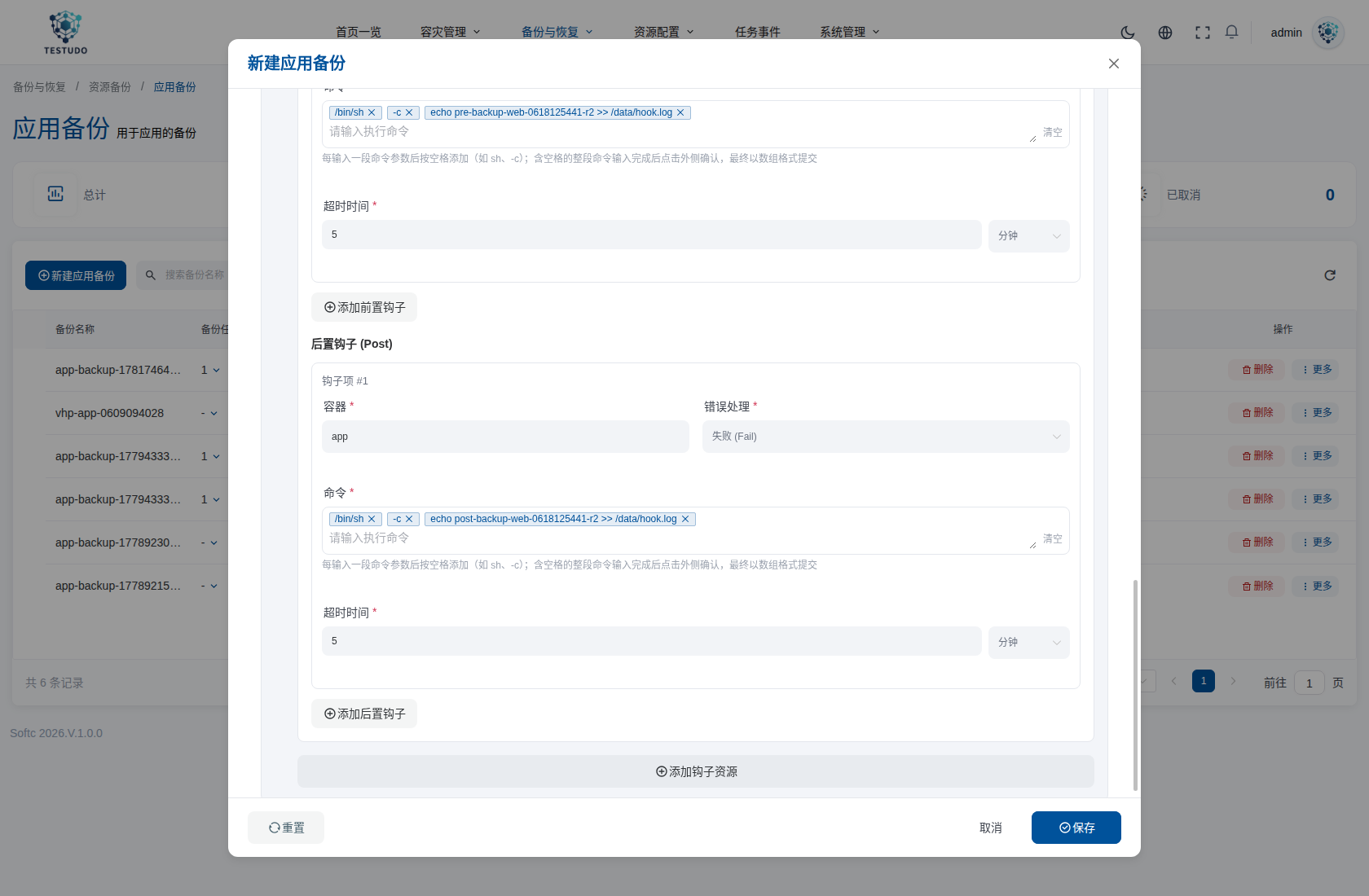
Backup hooks support:
pre: runs before backing up the matched Pod.post: runs after backing up the matched Pod.container: application container where the command runs.command: native Velero argv array.timeout: per-exec timeout.onError:FailorContinue.
AppRestore Hooks
Open Backup & Restore / App Restore, then enable restore hooks while creating a restore. Restore hooks are usually used to initialize restored Pods or inject init containers.
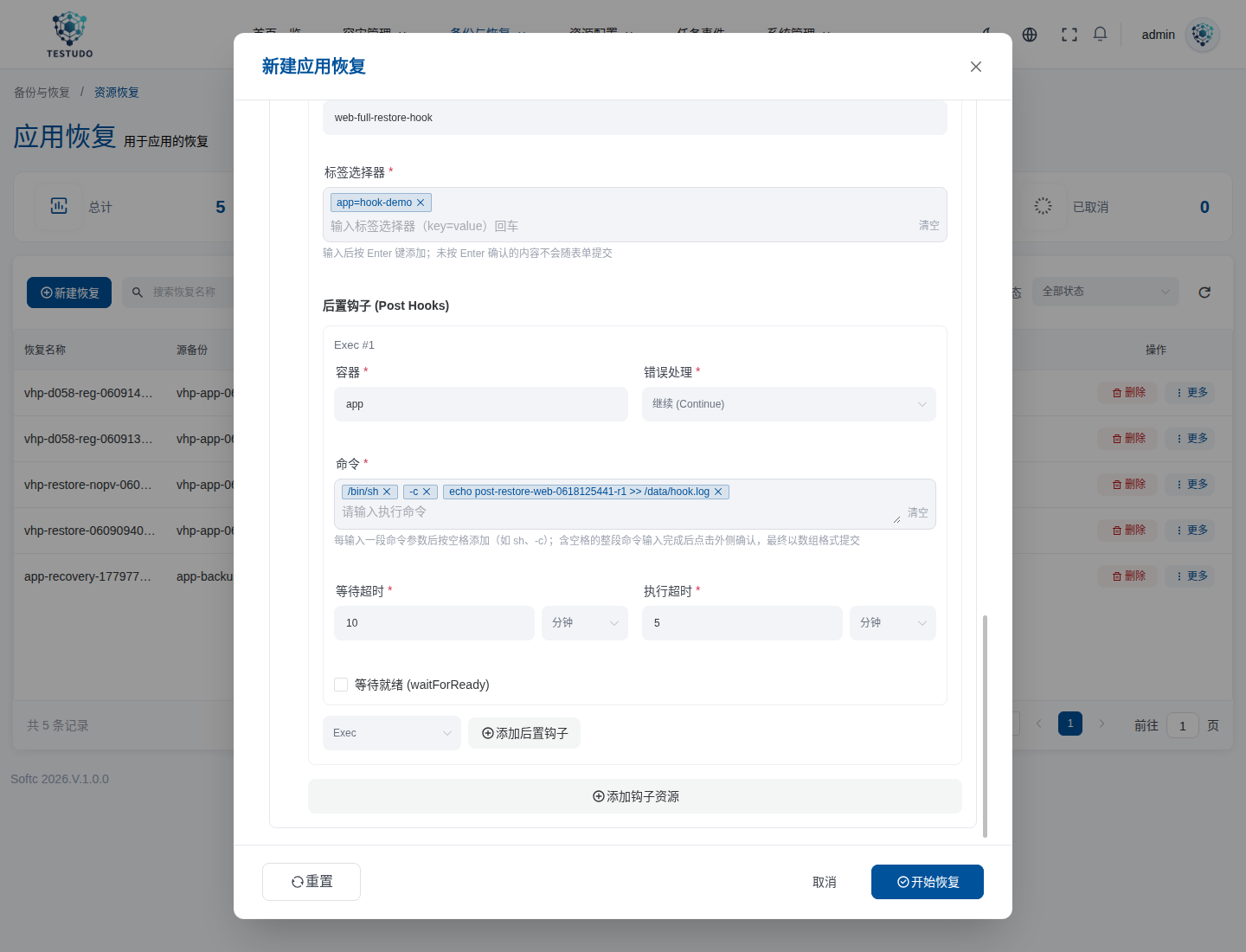
Restore hooks support:
postHooks[].exec: runs a command against restored Pods.postHooks[].init: injects an init container into restored Pods.waitForReady: whether to wait for the container to become ready.waitTimeout: ready wait timeout.execTimeout: command execution timeout.
DR Instance Hooks
Open DR Management / Instance Configuration, then create or edit a DR instance. Enable backup hooks and restore hooks in advanced options.
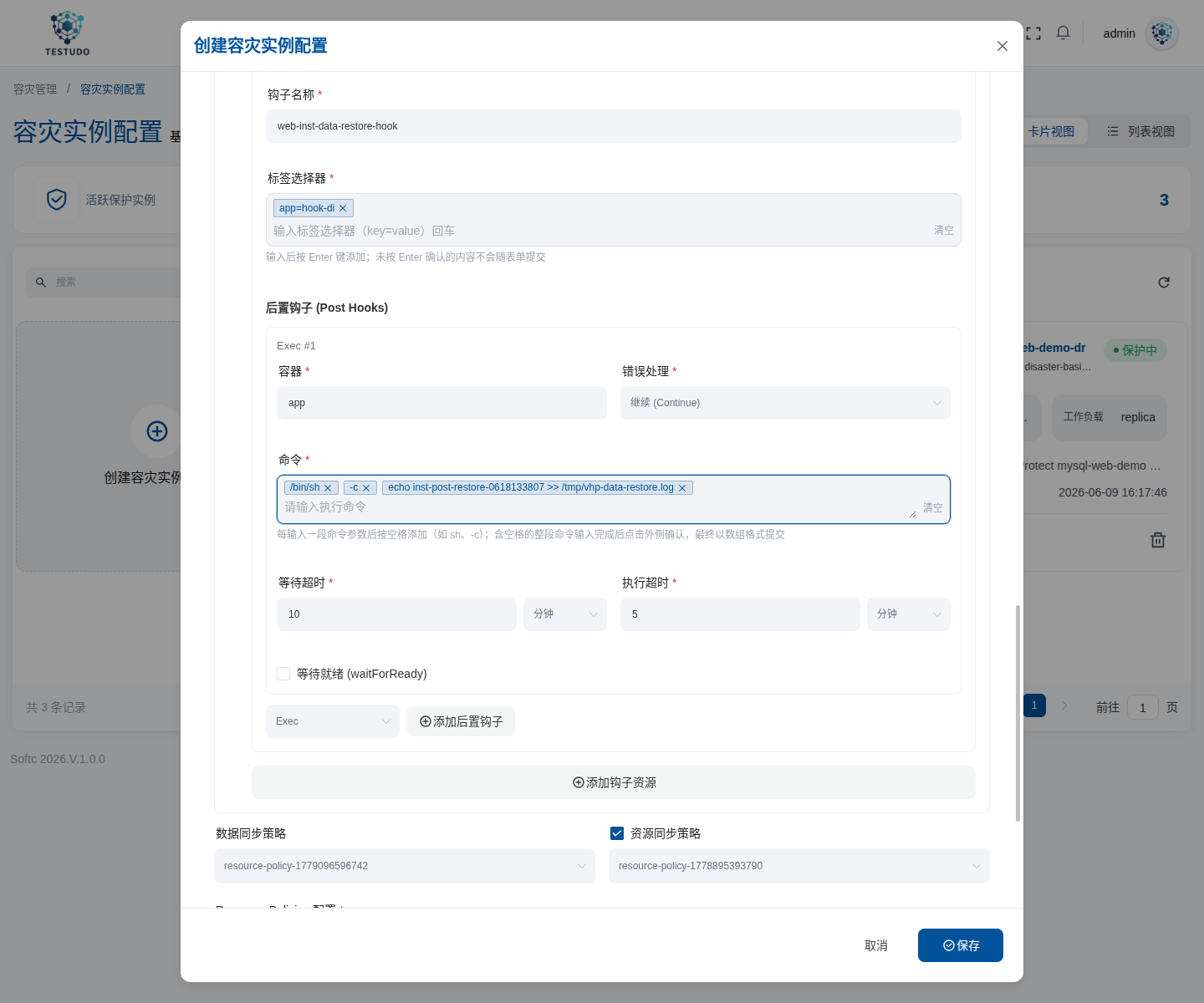
The saved instance stores:
spec:
  veleroHooks:
    dataBackup:
      resources: []
    dataRestore:
      resources: []
DataSync reads these fields:
dataBackupis projected to the AppBackup used for data sync backup.dataRestoreis projected to the AppRestore used for data sync restore.- When instance hooks are updated, later DataSync runs align the existing
ds-*AppBackup desired template before triggering a new backup.
Command Format
Hook commands must use the native Velero argv array. In the console, each blue chip is one array element.
Recommended:
["/bin/sh", "-c", "echo pre-backup >> /data/hook.log"]
Do not submit the whole command as a single string:
/bin/sh -c echo pre-backup >> /data/hook.log
That is not the structure Velero expects. The current console uses segmented chips and submits the final value as an array.
If a command needs shell expansion, put the shell itself in argv:
["/bin/sh", "-c", "dr-hook pre-backup --mode=${DR_MODE:-quiesce}"]
${DR_MODE} is expanded by the shell inside the application container. Testudo does not render or replace it.
Selectors And Multiple Init Hooks
Hook labelSelector uses the native Kubernetes LabelSelector semantics. Multiple keys in matchLabels are ANDed and cannot express OR for the same key:
labelSelector:
  matchLabels:
    app: abc
    tier: backend
For OR over multiple values of the same key, such as app=abc OR app=qwe, use matchExpressions with In:
labelSelector:
  matchExpressions:
    - key: app
      operator: In
      values:
        - abc
        - qwe
For OR across different keys or condition groups, such as app=abc OR component=qwe, split the configuration into multiple hook resources. Testudo passes the native Velero structure through and does not extend selector syntax.
Multiple restore init hooks are allowed. Velero injects the matched init hooks into restored Pods, and the final initContainers[].name values on the same Pod must be unique. Testudo does not rename or merge duplicate initContainer names. Use distinct names:
postHooks:
  - init:
      initContainers:
        - name: restore-init-db
          image: registry.example.com/dr-tools:1.0
  - init:
      initContainers:
        - name: restore-init-cache
          image: registry.example.com/dr-tools:1.0
Manual AppBackup Example
For API or CRD usage, backup hooks are stored in AppBackup.spec.template.hooks:
apiVersion: testudo.softcdata.com/v1
kind: AppBackup
metadata:
  name: bookinfo-backup-hook
spec:
  cluster: prod-a
  schedule: ""
  template:
    storageLocation: minio-dr
    includedNamespaces:
      - demo-bookinfo
    labelSelector:
      matchLabels:
        app: bookinfo
    hooks:
      resources:
        - name: app-quiesce
          includedNamespaces:
            - demo-bookinfo
          includedResources:
            - pods
          labelSelector:
            matchLabels:
              app: bookinfo
          pre:
            - exec:
                container: app
                command:
                  - /bin/sh
                  - -c
                  - echo pre-backup >> /data/hook.log
                onError: Fail
                timeout: 5m
          post:
            - exec:
                container: app
                command:
                  - /bin/sh
                  - -c
                  - echo post-backup >> /data/hook.log
                onError: Continue
                timeout: 5m
A one-time backup creates a Velero Backup with spec.hooks. A scheduled backup creates a Velero Schedule with spec.template.hooks.
Manual AppRestore Example
Restore hooks are stored in AppRestore.spec.template.hooks and projected to Velero Restore.spec.hooks:
apiVersion: testudo.softcdata.com/v1
kind: AppRestore
metadata:
  name: bookinfo-restore-hook
spec:
  cluster: prod-b
  backupName: bookinfo-backup-hook
  restorePVs: true
  targetCluster: prod-b
  template:
    backupName: bak-bookinfo-backup-hook-xxxx
    includedNamespaces:
      - demo-bookinfo
    namespaceMapping:
      demo-bookinfo: demo-bookinfo-restore
    hooks:
      resources:
        - name: app-after-restore
          includedNamespaces:
            - demo-bookinfo-restore
          includedResources:
            - pods
          labelSelector:
            matchLabels:
              app: bookinfo
          postHooks:
            - exec:
                container: app
                command:
                  - /bin/sh
                  - -c
                  - echo post-restore >> /data/hook.log
                onError: Continue
                waitForReady: false
                waitTimeout: 10m
                execTimeout: 5m
For init hooks, use native Kubernetes initContainer fields:
postHooks:
  - init:
      initContainers:
        - name: restore-init
          image: registry.example.com/dr-tools:1.0
          command:
            - /bin/sh
            - -c
          args:
            - dr-restore-init --namespace=$POD_NAMESPACE
          env:
            - name: POD_NAMESPACE
              valueFrom:
                fieldRef:
                  fieldPath: metadata.namespace
          envFrom:
            - secretRef:
                name: restore-hook-secret
      timeout: 10m
DR Instance Example
DR instance hooks apply to the automatic DataSync path:
apiVersion: testudo.softcdata.com/v1
kind: DisasterInstance
metadata:
  name: bookinfo-dr
spec:
  config: dc-prod
  namespaces:
    - demo-bookinfo
  veleroHooks:
    dataBackup:
      resources:
        - name: freeze-before-data-sync
          includedResources:
            - pods
          labelSelector:
            matchLabels:
              app: bookinfo
          pre:
            - exec:
                container: app
                command:
                  - /bin/sh
                  - -c
                  - echo inst-pre-backup >> /data/hook.log
                onError: Fail
                timeout: 5m
          post:
            - exec:
                container: app
                command:
                  - /bin/sh
                  - -c
                  - echo inst-post-backup >> /data/hook.log
                onError: Continue
                timeout: 5m
    dataRestore:
      resources:
        - name: init-after-data-restore
          includedResources:
            - pods
          labelSelector:
            matchLabels:
              app: bookinfo
          postHooks:
            - exec:
                container: app
                command:
                  - /bin/sh
                  - -c
                  - echo inst-post-restore >> /tmp/data-restore-hook.log
                onError: Continue
                waitForReady: false
                waitTimeout: 10m
                execTimeout: 5m
Trafficless Compatibility For DataSync dataRestore
DataSync data restore creates temporary Trafficless Pods so restored Pods are not routed by Services or adopted by workload controllers. Trafficless restore removes application labels and keeps platform isolation labels.
If the user-provided dataRestore exec post hook uses an application selector:
labelSelector:
  matchLabels:
    app: bookinfo
Testudo adapts the generated data restore AppRestore:
- It matches the original backed-up Pod with the user selector.
- After Trafficless labels are applied, it adds a system marker label to the restored Pod, such as
testudo.softcdata.com/data-restore-hook-0=true. - It rewrites the corresponding exec post hook selector to the marker selector.
- It preserves
command,container,onError,waitForReady,waitTimeout, andexecTimeout.
Init restore hooks are not marker-rewritten because they match the original object before Pod creation.
When inspecting the AppRestore created by DataSync, the dataRestore exec hook selector may not equal the application selector you entered on the instance. This is expected. Validate execution with Velero status.hookStatus and an application marker, not by byte-for-byte selector comparison.
DR Drill Hooks
Drills only support dataRestore hooks:
- If the drill does not configure
veleroHooks.dataRestore, it inherits the instance dataRestore hook. - If the drill configures
veleroHooks.dataRestore, it overrides the instance hook. The two are not merged. - If the drill explicitly submits
veleroHooks: {}, inheritance is cleared for this drill restore. - If the drill submits
veleroHooks.dataBackup, the server rejects it because drills do not create a new data backup.
API fragment:
{
  "name": "bookinfo-drill-hook",
  "instanceName": "bookinfo-dr",
  "veleroHooks": {
    "dataRestore": {
      "resources": [
        {
          "name": "drill-after-restore",
          "includedResources": ["pods"],
          "labelSelector": {
            "matchLabels": {
              "app": "bookinfo"
            }
          },
          "postHooks": [
            {
              "exec": {
                "container": "app",
                "command": ["/bin/sh", "-c", "echo drill-post-restore >> /data/hook.log"],
                "onError": "Continue",
                "waitForReady": false,
                "waitTimeout": "10m",
                "execTimeout": "5m"
              }
            }
          ]
        }
      ]
    }
  }
}
Validation And Safety Limits
The server validates common mistakes before the configuration reaches CRDs:
| Rule | Behavior |
|---|---|
Hook target resources explicitly exclude pods | Rejected |
| Empty command | Rejected |
onError is not Fail or Continue | Rejected |
Command contains platform placeholders such as ${testudo.namespace} or {{ namespace }} | Rejected |
Command, args, or env value contains obvious plaintext secrets such as password=plain or token=plain | Rejected with VeleroHookSensitiveParameter |
Backup exec timeout > 10m | Rejected |
Restore exec execTimeout > 10m | Rejected |
Restore exec waitTimeout > 30m | Rejected |
Restore init timeout > 30m | Rejected |
Pass sensitive values with Secret references:
envFrom:
  - secretRef:
      name: app-hook-secret
or:
env:
  - name: APP_TOKEN
    valueFrom:
      secretKeyRef:
        name: app-hook-secret
        key: token
Status
Velero writes hook execution summaries into Backup or Restore status:
status:
  hookStatus:
    hooksAttempted: 2
    hooksFailed: 0
Testudo echoes the status in:
AppBackup.status.history[].veleroStatus.hookStatusAppRestore.status.restoreStatus.hookStatus- DataSync sync history
backupHookStatusandrestoreHookStatus
Useful commands:
kubectl get appbackup <appbackup> -n disaster-system -o yaml
kubectl get apprestore <apprestore> -n disaster-system -o yaml
kubectl --context <source-cluster> -n velero get backup <velero-backup> -o yaml
kubectl --context <target-cluster> -n velero get restore <velero-restore> -o yaml
kubectl --context <cluster> -n <app-namespace> exec deploy/<workload> -- cat /data/hook.log
For DR instance paths, inspect generated AppBackup and AppRestore resources:
kubectl get datasync -n disaster-system
kubectl get appbackup -n disaster-system | grep '^ds-'
kubectl get apprestore -n disaster-system | grep '^rec-ds-'
Troubleshooting
| Symptom | Likely cause | Action |
|---|---|---|
Empty hookStatus | Selector did not match a Pod, or the hook does not apply to that restore phase | Check namespace, includedResources, labelSelector, and backup/restore scope |
hooksAttempted > 0 but hooksFailed > 0 | Command exited non-zero, or container/path is missing | Check Velero describe/logs and application container logs |
| Server returns a sensitive-parameter error | Plaintext password/token/secret appears in command or args | Use Secret env, Secret envFrom, or mounted files |
| Server returns a timeout error | Timeout exceeds platform limits | Lower timeout or move long work into an asynchronous application-side task |
| DataSync dataRestore AppRestore uses a platform marker selector | Trafficless compatibility rewrite | Expected; validate hookStatus and application markers |
| ResourceSync has no hooks | ResourceSync does not project hooks | Use DataSync dataRestore or Drill dataRestore when a restore-time command is required |
| Restore succeeds but temporary restored Pods disappear | DataSync cleaned up Trafficless temporary Pods | Validate persisted hook output or Velero hookStatus, not only the temporary Pod's presence |