Failover Workflow
Testudo V2 uses the Pilot Light model for DR failover. During normal protection, data and resources are continuously synchronized to the secondary cluster. The secondary cluster keeps a switch-ready resource skeleton, but workloads normally stay at replicas=0 and do not receive production traffic.
This page explains the instance-level failover workflow. For console steps, see Run Instance Failover.
If a failover step fails or times out, the operator may auto-compensate based on the failed stage. See Failover Auto-Compensation.
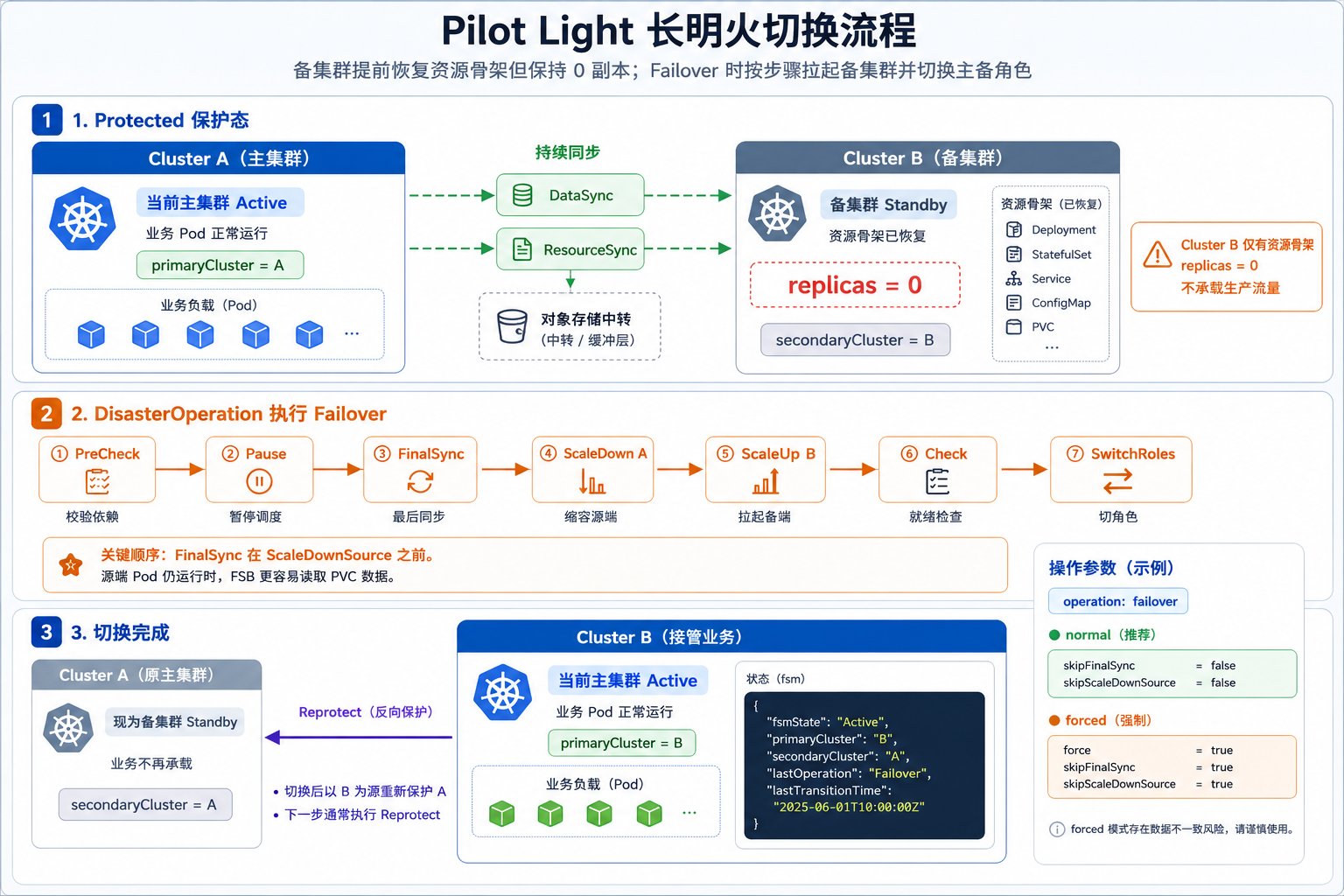
Editable source: pilot-light-failover-workflow.excalidraw
Pilot Light State
When a DR instance is Protected, the relationship is normally:
| Object | Primary cluster | Secondary cluster |
|---|---|---|
| Business workloads | Running | Resource skeleton exists, usually with replicas=0 |
| Data | Continuously backed up | Continuously restored or ready to restore |
| Kubernetes resources | Original resources | Standby resources restored by ResourceSync |
| External traffic | Routed by the external traffic system | Does not serve production traffic |
The goal is to reduce cold recovery time. Failover does not create everything from scratch; it activates resources already prepared on the secondary cluster.
Preconditions
Before failover, the instance should normally be:
primaryCluster   = current primary cluster
secondaryCluster = current secondary cluster
fsmState         = Protected
Check that:
- The latest DataSync succeeded.
- The latest ResourceSync succeeded.
- Standby resources exist on the target cluster.
- Target-side images, Secrets, StorageClasses, IngressClasses, CRDs, and network dependencies are ready.
- DNS, gateway, load balancer, or traffic switching procedures are ready outside Testudo.
Testudo orchestrates Kubernetes resource and data recovery. It does not replace external global traffic management.
Standard Steps
Failover creates a DisasterOperation with operationType=failover. The current implementation runs:
PreCheck
  -> PauseSchedules
  -> FinalSync
  -> ScaleDownSource
  -> ScaleUpTarget
  -> CheckReplicas
  -> SwitchRoles
1. PreCheck
The operator checks the instance, DR config, clusters, storage repository, ResourceSync/DataSync state, and restore policy rules.
This step is designed to catch problems before destructive actions start. If precheck fails, source scaling is not executed.
2. PauseSchedules
The operator pauses DataSync and ResourceSync schedules so a new sync does not start while failover is running.
3. FinalSync
The operator triggers one final DataSync and ResourceSync and waits for them to complete.
FinalSync must run before ScaleDownSource because Velero FSB needs source Pods to stay running so it can read mounted PVC data. If source Pods are scaled down first, the final data sync may miss PVC contents.
If the user skips final sync, the operator uses the most recent successful sync point. This is useful when the source cluster is unreachable, but it increases RPO risk.
4. ScaleDownSource
The operator scales workloads down on the current primary cluster. Before scaling down, it records original replica counts for later target activation.
5. ScaleUpTarget
The operator restores Deployment and StatefulSet replica counts on the current secondary cluster.
The target side normally starts from standby resources created by ResourceSync, often with replicas=0.
6. CheckReplicas
The operator checks that target workload replicas were applied. Depending on skipPodReadyCheck, it may also wait for ready replicas.
Use skipPodReadyCheck=true only when an external dependency is expected to keep Pods unready during the transition or when the runbook explicitly accepts that risk.
7. SwitchRoles
After target activation succeeds, the operator switches instance roles:
primaryCluster   = old secondary cluster
secondaryCluster = old primary cluster
fsmState         = Active
After this step, follow with reprotect when the new primary must protect back to the old primary.
Operation Parameters
Common failover parameters:
| Parameter | Meaning | Typical use |
|---|---|---|
skipFinalSync | Skip the last DataSync/ResourceSync | Source cluster is unreachable, or fast failover from latest known sync point is required |
skipPodReadyCheck | Do not wait for target Pods to become Ready | Business readiness is verified by another system, or readiness probes are expected to fail temporarily |
operationTimeoutMinutes | Operation-level timeout | Large workloads or slow storage need longer timeouts |
Normal failover example:
{
  "operationType": "failover",
  "parameters": {
    "skipFinalSync": false,
    "skipPodReadyCheck": false,
    "operationTimeoutMinutes": 60
  }
}
Forced failover from the last successful sync point:
{
  "operationType": "failover",
  "parameters": {
    "skipFinalSync": true,
    "skipPodReadyCheck": true,
    "operationTimeoutMinutes": 30
  }
}
After Failover
After failover succeeds:
- Verify workloads and PVC data on the new primary cluster.
- Switch external traffic to the new primary cluster.
- Confirm that the old primary is not still serving traffic.
- Run
reprotectafter the environment is stable, so synchronization direction becomes new primary to new secondary.
Common Risks
| Risk | Symptom | Recommendation |
|---|---|---|
| FinalSync takes too long | Operation timeout or delayed failover | Tune schedule, storage throughput, and operation timeout before production |
| Source cluster is unreachable | PreCheck or FinalSync fails | Use forced failover only when the runbook accepts the RPO risk |
| Target dependency is missing | Workloads cannot start after ScaleUpTarget | Validate StorageClass, IngressClass, CRD, image pull, Secret, and network dependencies through drills |
| External traffic not switched | Target workloads are running but users still hit the old site | Keep global traffic switching in the failover runbook |
Drills validate the restore path, but a production failover still needs traffic switching and source/target role control.