Data Sync Internals
Testudo data sync is not database-level real-time replication. It is a periodic backup plus target-side restore workflow built around Velero. DataSync schedules and orchestrates the run, AppBackup creates Velero Backup objects on the current primary cluster, and AppRestore creates Velero Restore objects on the secondary cluster. PVC data is moved through Velero file-system backup (FSB) and object storage.
This model fits Pilot Light DR: the secondary cluster keeps a standby resource skeleton, while data is refreshed on a schedule. During failover, the target side does not need to restore all data from scratch.
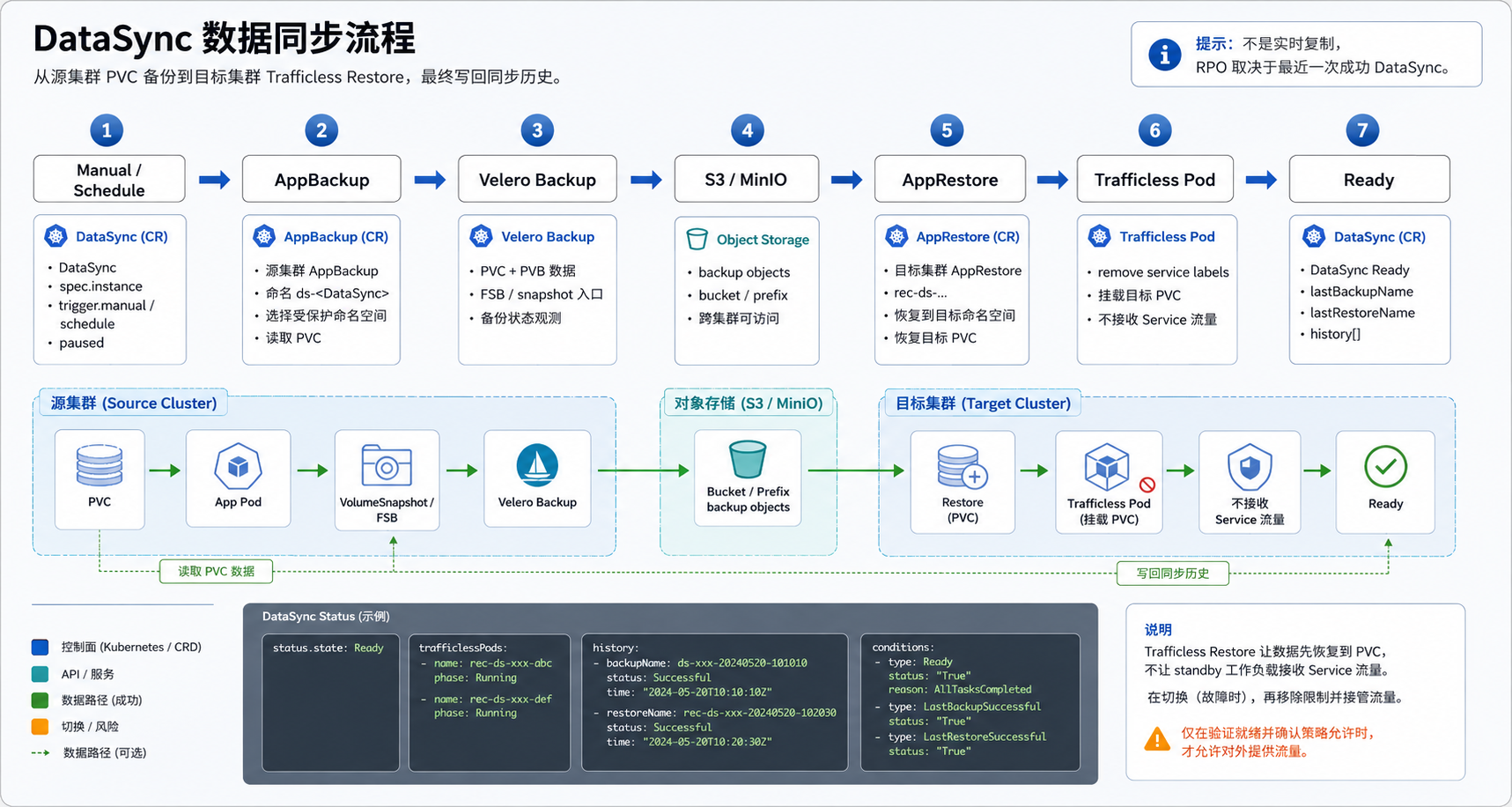
Editable source: data-sync-flow.excalidraw
Mental Model
DisasterInstance
  -> DataSync
  -> AppBackup  -> source Velero Backup  -> object storage
  -> AppRestore -> target Velero Restore -> target PVC
| Layer | Object | Responsibility |
|---|---|---|
| User intent | DisasterInstance | Defines namespaces, selectors, restore policy, and primary/secondary roles |
| Sync control | DataSync | Registers schedules, triggers syncs, connects backup and restore, records history |
| Backup wrapper | AppBackup | Creates and observes Velero Backup on the source cluster |
| Restore wrapper | AppRestore | Creates and observes Velero Restore on the target cluster |
| Data plane | Velero FSB | Reads mounted volumes from source Pods, uploads data, and restores it into target PVCs |
| Storage | StorageRepository / BSL | Provides Velero access to S3/MinIO-compatible object storage |
Sync Direction
DataSync follows the runtime primary and secondary cluster roles.
If DisasterInstance.status.primaryCluster and secondaryCluster are set:
source = primaryCluster
target = secondaryCluster
If runtime roles are not set yet, the operator falls back to the static DisasterConfig:
source = DisasterConfig.spec.sourceCluster
target = DisasterConfig.spec.targetCluster
After failover or reprotect, DataSync does not need a new object name. The operator re-evaluates the current roles and changes the direction to the new primary-to-secondary path.
Triggers
DataSync has three trigger paths.
| Trigger | Description |
|---|---|
| Initial sync | If status.lastSyncTime is empty, the operator starts a first sync so the instance can become protected |
| Scheduled sync | spec.trigger.schedule is a standard five-field cron expression registered in the operator SyncScheduler |
| Manual sync | Updating spec.trigger.manual to a new RFC3339 timestamp triggers an immediate sync |
When spec.paused=true, scheduled jobs are removed. A running sync continues to advance. Manual sync is used for operations such as creating a restore point before a release, validating a changed restore policy, or executing failover FinalSync.
If the previous sync is still InProgress, a new cron trigger is skipped to avoid concurrent writes to the same DataSync state.
Backup Phase
At the start of a sync, the operator first verifies that StorageRepository is available, then creates or reuses a long-lived AppBackup:
AppBackup name = ds-<DataSync name>
Each sync run writes a new backup action to this object:
spec:
  action:
    type: Backup
    requestAt: "<current time>"
AppBackup then creates a Velero Backup in the source cluster velero namespace. The DataSync backup template is roughly:
includedNamespaces:
  - <protected namespace>
excludedNamespaces:
  - velero
  - kube-system
includedResources:
  - pods
  - persistentvolumeclaims
  - persistentvolumes
snapshotVolumes: false
defaultVolumesToFsBackup: true
storageLocation: <BSL derived from StorageRepository>
The important fields are:
| Field | Meaning |
|---|---|
includedResources includes pods/pvc/pv | Velero FSB needs Pod and volume metadata to locate data |
snapshotVolumes=false | CSI VolumeSnapshot is not the primary path |
defaultVolumesToFsBackup=true | Velero file-system backup is used |
storageLocation | Points to the object storage BSL |
Runtime BSL names are suffixed by cluster:
<StorageRepository>-<sourceCluster>
The object storage prefix uses the source cluster name. This allows several clusters to share a bucket without overwriting each other.
Restore Phase
After the source Velero Backup completes, DataSync creates a target-side AppRestore:
AppRestore name = rec-ds-<DataSync name prefix>-<BackupName hash>
The target-side AppRestore first ensures that the target cluster can read the source backup through a BSL:
BSL name = <StorageRepository>-<sourceCluster>
prefix   = <sourceCluster>
Then it creates a Velero Restore. The data restore template is roughly:
backupName: <current Velero Backup name>
includedNamespaces:
  - <protected namespace>
includedResources:
  - pods
  - persistentvolumeclaims
  - persistentvolumes
restorePVs: true
existingResourcePolicy: None
preserveNodePorts: true
Normal DataSync uses existingResourcePolicy=None so it does not overwrite standby resources that already exist. Drill paths may use Update when restoring into a drill namespace.
If the instance has a restore policy, the operator applies it while building AppRestore, including StorageClass mappings, IngressClass mappings, and modifier rules. The apply target is dataSync, so only rules appropriate for the data restore path should be configured there.
PVC volumeName Cleanup
During the first initializing data restore, DataSync also injects a system-level ResourceModifier that removes the static PVC volume binding:
resourceModifierRules:
  - conditions:
      groupResource: persistentvolumeclaims
      namespaces:
        - <protected namespace>
    patches:
      - operation: remove
        path: /spec/volumeName
Velero backups may contain PVCs with the source cluster spec.volumeName. That field means the PVC is already bound to a specific PV name. Source PV names usually cannot be reused directly in the target cluster. Restoring that binding as-is can leave the target PVC pointing at a missing source-side PV, or conflict with the PV that the target cluster dynamically provisions.
The current implementation injects this cleanup rule only at this exact point:
DataSync.status.lastSyncTime == nil
AND DisasterInstance.status.fsmState == Initializing
In other words, it only affects the first DataSync restore during instance initialization. After the first sync completes, later scheduled syncs do not automatically remove volumeName, so the operator does not disturb PVC bindings that have already stabilized on the target side.
After volumeName is removed, the target PVC must bind again. The target cluster therefore needs a working StorageClass/provisioner, or pre-created static PVs that satisfy the PVC requirements. If the target side has neither dynamic provisioning nor a matching PV, the PVC stays Pending, the trafficless Pod cannot mount the volume, and Velero PodVolumeRestore / DataDownload cannot complete.
If the instance has no restorePolicy, the operator appends this rule directly to AppRestore.spec.resourceModifierRules for the DataSync restore. If the instance has a restorePolicy, the operator injects it as a system-protect rule during policy compilation, so user-defined modifier rules cannot override this safety patch.
Drill data restore has the same protection when namespaceMapping restores a source namespace into a different target namespace. In that case, the operator injects PVC volumeName cleanup for the mapped target namespace so drill PVCs do not carry source-side PV bindings into the new namespace.
Why Trafficless Restore Exists
Velero FSB restore needs a target Pod that mounts the PVC. In Pilot Light mode, target workloads usually stay at replicas=0:
The target cluster has StatefulSet / Deployment / PVC
but no business Pod is running
Without a Pod, Velero Node Agent has no mount point to write to. If the original business Pod is restored directly, it may match a Service selector and receive traffic too early, or be adopted by a Deployment/StatefulSet controller.
Trafficless Restore restores a temporary Pod whose only job is to mount the PVC and receive data.
How The Temporary Pod Avoids Traffic
DataSync injects a ResourceModifier rule for pods:
resourceModifierRules:
  - conditions:
      groupResource: pods
    patches:
      - operation: add
        path: /metadata/labels
        value: '{"trafficless": "true"}'
      - operation: add
        path: /metadata/ownerReferences
        value: '[]'
      - operation: replace
        path: /spec/containers/0/image
        value: busybox:1.36
      - operation: add
        path: /spec/containers/0/command
        value: '["sleep","3600"]'
| Patch | Purpose |
|---|---|
Replace labels with trafficless=true | Prevents Service selectors from routing business traffic to this Pod |
Clear ownerReferences | Prevents workload controllers or GC from immediately adopting or deleting it |
Replace image with busybox:1.36 | Avoids starting the real business process |
Add sleep 3600 | Keeps the Pod alive long enough for Velero Node Agent to restore volume data |
The Pod name and volume mounts still come from backup metadata, so Velero can write data into the corresponding target PVC. After restore succeeds, DataSync cleans up target Pods marked with trafficless=true.
In offline environments, the trafficless image must also be pullable from the target cluster. It is not the same setting as veleroInstall.imageRegistry; that setting only controls images used to install Velero components.
Relationship With ResourceSync
DataSync moves PVC data. It does not restore the full business resource skeleton. Pilot Light requires both DataSync and ResourceSync:
| Path | Main content | Target-side result |
|---|---|---|
ResourceSync | Deployments, StatefulSets, Services, ConfigMaps, Secrets, PVC objects, and other Kubernetes resources | Standby resources exist, usually with replicas=0 |
DataSync | Pod, PVC, PV metadata and volume file data | Target PVCs contain the latest synchronized data |
A healthy protected state normally requires:
DataSync      = Ready
ResourceSync  = Ready
DisasterInstance.fsmState = Protected
Relationship With Failover
Failover runs FinalSync, which triggers DataSync and ResourceSync one last time before activation.
The current step order is:
PauseSchedules
  -> FinalSync
  -> ScaleDownSource
  -> ScaleUpTarget
FinalSync must happen before ScaleDownSource because FSB backup needs source Pods to stay running so it can read mounted PVC data. If source workloads are scaled to zero first, the last data sync may not include PVC data.
If the source cluster is already unreachable, users can skip final sync and fail over from the most recent successful DataSync restore point. This increases RPO risk and should be used only when necessary.
Consistency Boundary
DataSync is file-system-level backup and restore orchestration. It does not guarantee database transaction consistency.
| Scenario | Risk | Recommendation |
|---|---|---|
| Databases or queues with active writes | Backup time may not match an application-consistent transaction point | Use application freeze hooks, a read-only window, or database-native replication |
| Large PVCs | One FSB backup/restore may take longer than the RPO schedule | Size Velero Node Agent resources, object storage throughput, and network bandwidth |
| Applications with many PVCs | Cross-volume consistency depends on the application | Sync during low traffic or use application-level consistency tooling |
| Source Pods already stopped | FSB may not read the latest PVC contents | Do not scale down the source before FinalSync during normal failover |
Status And Troubleshooting
Key DataSync fields:
| Field | Meaning |
|---|---|
status.state | Ready, InProgress, or Failed |
status.reason / status.message | Machine-readable and human-readable failure information |
status.lastSyncTime | Last completed sync time |
status.lastBackupName | Last related Velero Backup name |
status.lastRestoreName | Last related AppRestore name |
status.history | Backup name, restore name, counts, duration, and result for recent runs |
Useful commands:
kubectl -n disaster-system get datasync
kubectl -n disaster-system get datasync <datasync-name> -o yaml

kubectl -n disaster-system get appbackup \
  -l testudo.softcdata.com/app-resource-owner-kind=datasync,\
testudo.softcdata.com/app-resource-owner-name=<datasync-name>

kubectl -n disaster-system get apprestore \
  -l testudo.softcdata.com/app-resource-owner-kind=datasync,\
testudo.softcdata.com/app-resource-owner-name=<datasync-name>
Source cluster:
kubectl --context <source-cluster> -n velero get backup \
  -l testudo.softcdata.com/app-backup-name=ds-<datasync-name>
kubectl --context <source-cluster> -n velero get podvolumebackup
kubectl --context <source-cluster> -n velero get dataupload
Target cluster:
kubectl --context <target-cluster> -n velero get restore
kubectl --context <target-cluster> -n velero get podvolumerestore
kubectl --context <target-cluster> -n velero get datadownload
kubectl --context <target-cluster> -A get pod -l trafficless=true
Related docs: