Review Drill Results, Rerun, And Cleanup
The current console does not provide a separate drill report export flow. Drill results are reviewed through DR Management / Disaster Drill, drill status, execution steps, and the related DisasterOperation.
Review Results
Open DR Management / Disaster Drill. The list or card view shows:
- Drill task name.
- DR object: disaster instance or disaster group.
- Drill target cluster.
- Creation time.
- Last drill time, from the drill completion time.
- Drill status.
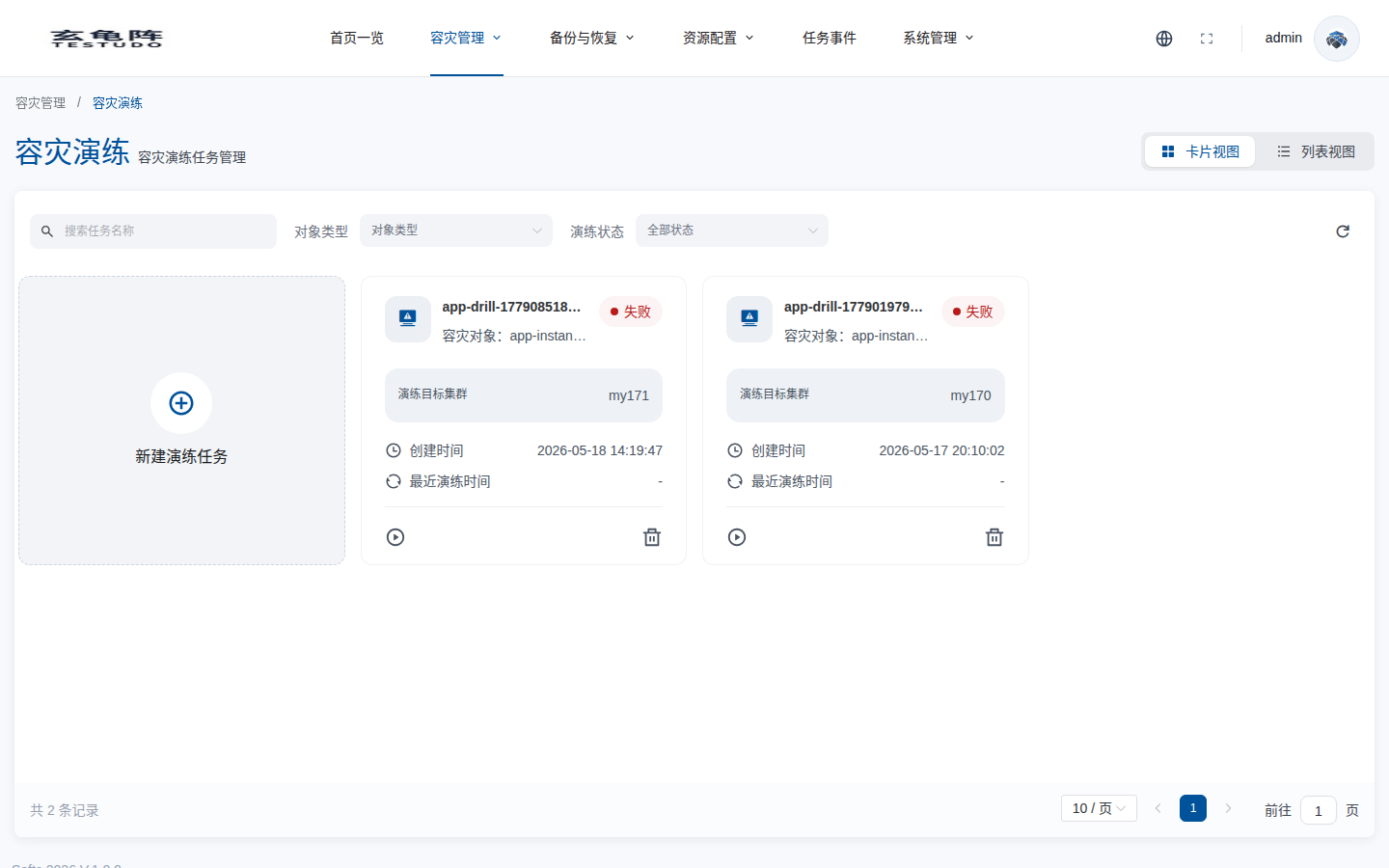
Status filters map to backend states as follows:
| Console filter | Backend state | Meaning |
|---|---|---|
| Not drilled | Pending / Ready | Created, validating, or validated and waiting for execution. |
| Drilling | Executing | Confirmed and running restore/scale-up steps. |
| Completed | Completed | Drill execution completed; cleanup can be triggered. |
| Failed | Failed | Validation, execution, or cleanup failed. |
| Cleaning up | CleaningUp | Cleanup has been triggered and is waiting for the cleanup operation. |
| Cleaned up | CleanedUp | Drill resources have been cleaned up. |
For full status details, inspect the drill details or query the CR:
kubectl -n disaster-system get disasterdrill <drill-name> -o yaml
Check these fields:
status.state: current state.status.reason/status.message: failure reason and message.status.restoreMode: normallyFullRestorein the current version.status.currentStep: current step.status.steps: step state, start time, completion time, and message.status.validationResults: preflight validation result.status.groupProgress: group drill level progress.
Execute A Drill
After creation, a drill enters Pending. When preflight validation passes, the operator moves it to Ready. Only a Ready drill can be confirmed for execution.
Clicking Run drill in the console opens the execution confirmation dialog. Confirming calls:
POST /apis/disasterdrills.testudo.softcdata.com/v1/drills/:name/confirm
The API sets spec.confirmed=true. The operator then creates a drill DisasterOperation and moves the drill to Executing.
The current instance-level drill path always uses full restore. The usual execution steps are:
RestoreResource -> RestoreData -> ScaleUp
RestoreResource: restores Kubernetes resources from the latest ResourceSync backup.RestoreData: restores PVC data from the latest DataSync backup.ScaleUp: scales target-cluster workloads according to the recorded replica counts.
Inspect Execution Details
status.operationName records the related DisasterOperation. Use it to inspect steps and restore objects:
op=$(kubectl -n disaster-system get disasterdrill <drill-name> -o jsonpath='{.status.operationName}')
kubectl -n disaster-system get disasteroperation "$op" -o yaml
To inspect resource and data restore objects:
resource_restore=$(kubectl -n disaster-system get disasteroperation "$op" -o jsonpath='{.status.resourceRestoreName}')
data_restore=$(kubectl -n disaster-system get disasteroperation "$op" -o jsonpath='{.status.dataRestoreName}')

kubectl -n disaster-system get apprestore "$resource_restore" -o yaml
kubectl -n disaster-system get apprestore "$data_restore" -o yaml
These objects are better than the list page for diagnosing failures such as unavailable backups, target-cluster restore failures, PVC restore failures, or Pod readiness issues.
Rerun A Drill
The current console has no Rerun drill button or direct rerun action. To validate again from the platform UI, create a new drill task.
The server keeps a rerun API mainly for API-level integration or future extension:
POST /apis/disasterdrills.testudo.softcdata.com/v1/drills/:name/restart
The rerun API only accepts Completed or Failed drills. It does not continue the old operation directly. Instead, it writes a restart timestamp to the DisasterDrill; the operator then:
- Resets
spec.confirmedtofalse. - Clears the old status.
- Resets the state to
Pending. - Runs preflight validation again.
- Moves the drill to
Readyafter validation, where it still needs to be confirmed again.
If a drill is already CleaningUp or CleanedUp, do not treat it as rerunnable. Create a new drill task for a new validation run.
Cleanup Drill Resources
Cleanup can only be triggered from Completed. In the console, after a drill completes, the primary action changes from Run drill to Run cleanup. Clicking it calls:
POST /apis/disasterdrills.testudo.softcdata.com/v1/drills/:name/cleanup
The API sets spec.cleanup=true. The operator creates a DisasterOperation with operationType=drill-cleanup and moves the drill to CleaningUp.
Cleanup behavior depends on namespace mapping:
| Case | Cleanup behavior |
|---|---|
namespaceMapping configured | Deletes the mapped drill namespaces in the target cluster. |
No namespaceMapping | Does not delete namespaces; scales target-cluster workloads down to 0 to avoid deleting real standby resources. |
When cleanup succeeds, the drill becomes CleanedUp. If cleanup fails, the drill becomes Failed and status.reason/status.message record the failure.
Repeated cleanup does not create another cleanup task. Once spec.cleanup=true, the cleanup API rejects another cleanup request.
Delete Is Not Cleanup
The delete action removes the DisasterDrill task object. It is not the same as cleaning up drill resources in the target cluster.
Recommended order:
- Save the evidence you need after the drill completes.
- Trigger cleanup for a
Completeddrill. - Confirm the state becomes
CleanedUp. - Delete the drill task object only if you no longer need it.
Before deleting the drill task, review dependencies and cleanup plans so that you do not remove DisasterOperation, events, or restore objects that are still needed for troubleshooting.
What To Record
For each formal drill, record at least:
- Drill object: instance or group.
- Target cluster and namespace mapping.
- Creation time, execution confirmation time, and completion time.
status.state,status.reason, andstatus.message.- Duration and result of each entry in
status.steps. - Related
DisasterOperationname. - Resource and data
AppRestorenames. - RTO: time from confirmation to application readiness.
- RPO: time gap between the restore point and the latest source-side data.
- Manual actions and issues to fix before the next drill.