Create An Application Backup
AppBackup wraps Velero Backup with platform-level fields for cluster, namespace, repository, schedule, and history.
When To Create A Manual Backup
- Before application upgrades.
- Before risky data changes.
- Before failover final validation.
- When troubleshooting periodic backup failures.
Console Steps
- Open Backup And Restore / Application Backup.
- Click Create Backup.
- Select the source cluster.
- Select namespaces.
- Select the storage repository.
- Configure labels and resource filters if needed.
- Save and watch status.
Select Cluster And Namespaces
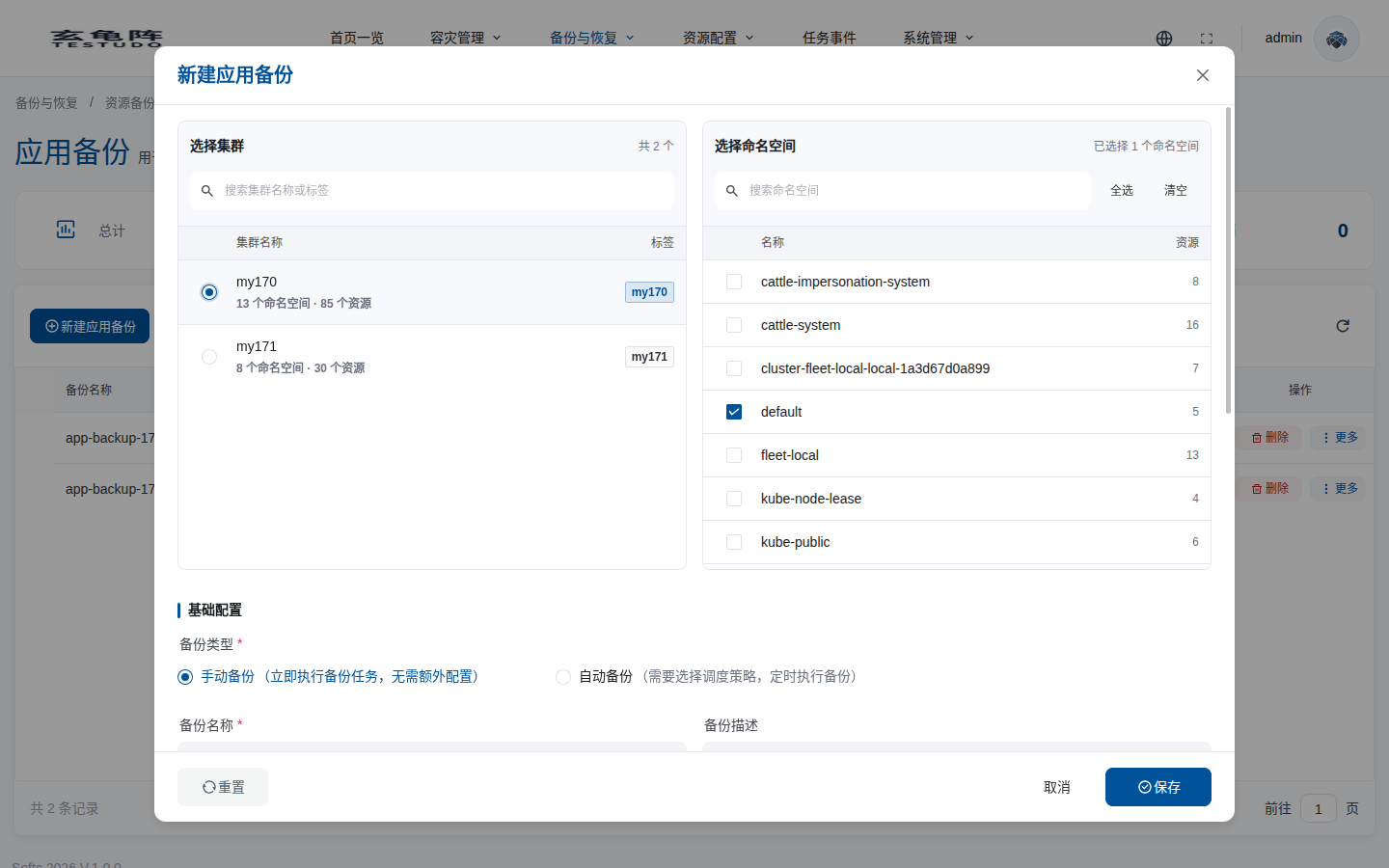
First select the source cluster that actually runs the workload. After a cluster is selected, the namespace list on the right is loaded from that cluster. The resource count helps you confirm whether the namespace contains resources that can be protected.
| Option | Meaning | Recommendation |
|---|---|---|
| Select cluster | Kubernetes cluster where the backup reads resources. Only one cluster can be selected. | Select the real source cluster, not the restore or drill target cluster. |
| Search cluster name or label | Filters clusters by name or label. | Use labels to distinguish production, test, and region in multi-cluster environments. |
| Select namespace | Namespace scope included in this backup. | Select one or more application namespaces. Avoid backing up system namespaces by default. |
| Select all / Clear all | Quickly selects or clears namespaces from the current cluster. | Use select all only after system, monitoring, logging, and temporary namespaces are intentionally handled. |
| Search namespace | Finds namespaces in the selected cluster. | Search by business prefix before selecting namespaces. |
Basic And Storage Configuration
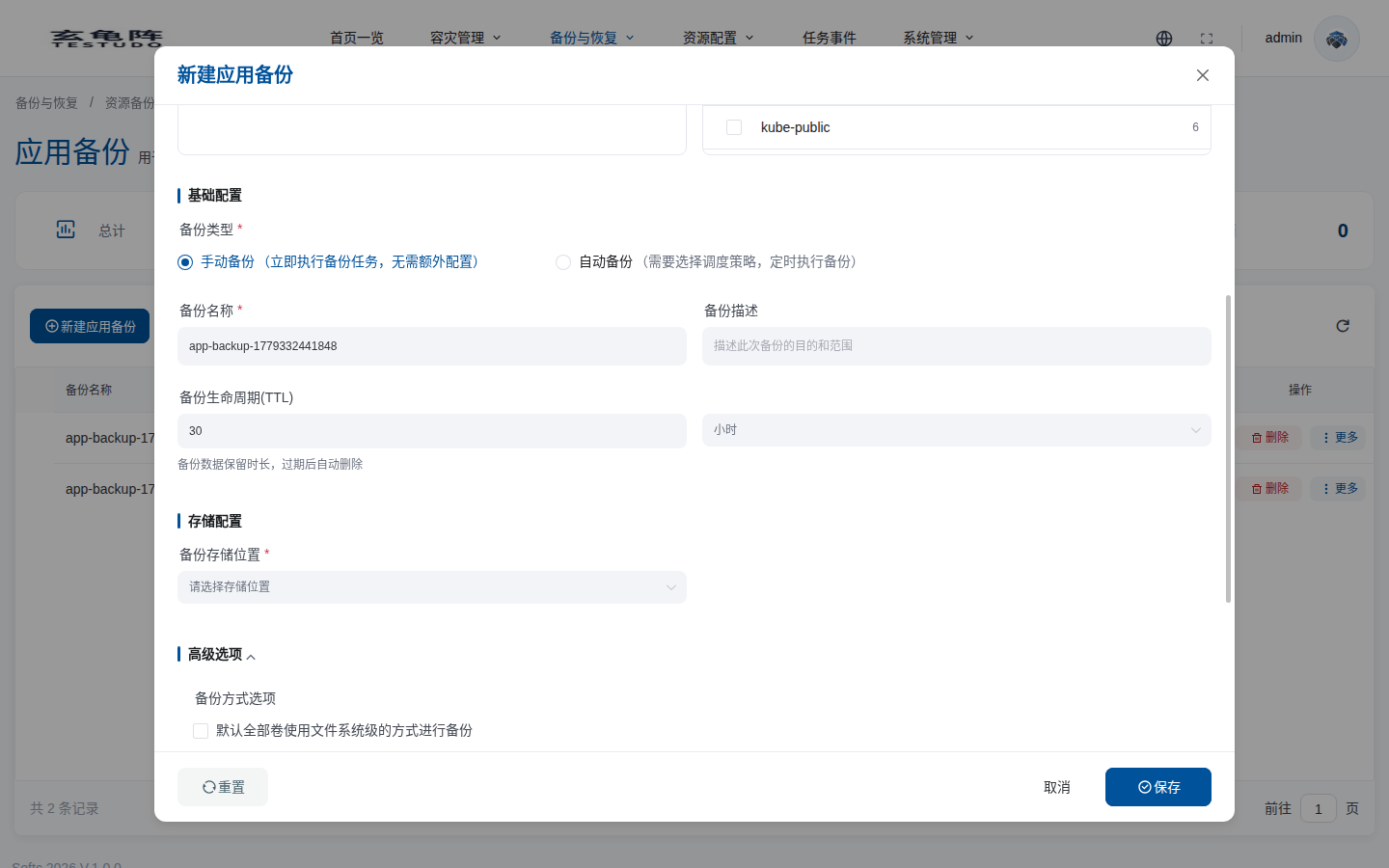
Scroll down in the dialog to configure backup type, backup name, TTL, and storage location. No AppBackup is created until you save.
| Option | Meaning | Recommendation |
|---|---|---|
| Backup type | Manual backup runs immediately. Auto backup requires an AutoBackup schedule policy and runs periodically. | Use manual backup for one-time protection points and auto backup for periodic protection. |
| Backup policy(Cron) | Appears for auto backup and controls the schedule. | Create and enable an AutoBackup policy under Resource Configuration / DR Policy Management first. |
| Backup name | Platform AppBackup object name. | Use business, environment, and time semantics, for example bookinfo-prod-a-manual. |
| Backup description | Records the purpose, scope, or maintenance window. | Keep enough context for audit and later restore selection. |
| Backup lifecycle(TTL) | Retention time for backup data. Velero cleans up expired data. | Keep drill backups short-lived; set production retention based on compliance and capacity. |
| Backup storage location | BSL / repository where backup data is written. | Choose a repository that both the source cluster and future restore target clusters can access. |
Advanced Options: Volumes And Resource Policies
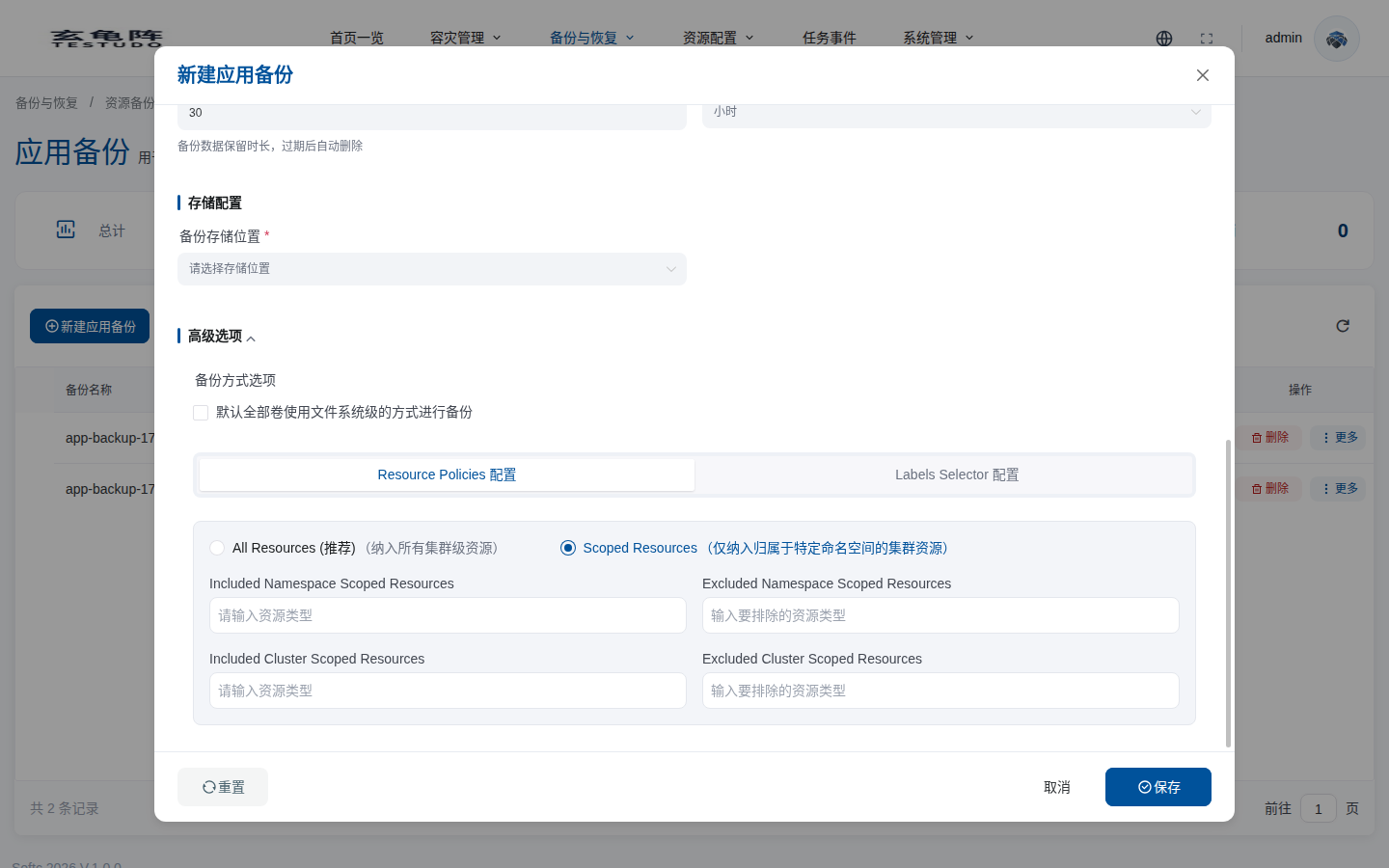
Advanced options control volume backup behavior and resource filtering. Continue scrolling to see the full section.
| Option | Meaning | Recommendation |
|---|---|---|
| Default all volumes to file-system backup | Uses file-system backup for volume data instead of relying on a snapshot backend. | Enable when CSI snapshots are unavailable or cross-cluster portability matters. Large volumes take longer. |
| Resource Policies | Controls which resource types are included or excluded. | Validate in a test namespace before using in production. |
| All Resources | Includes all cluster-scoped resources and lets you control resource types through Included / Excluded Resources. | Use only when CRDs, ClusterRoles, or other cluster-scoped resources are required. |
| Scoped Resources | Includes only resources related to selected namespaces and separately controls namespace-scoped and cluster-scoped resources. | Preferred for application-level backup because it reduces impact on the target cluster. |
| Included Namespace Scoped Resources | Includes only selected namespace-scoped resource types. | Leave empty for the default scope; fill in only for precise control. |
| Excluded Namespace Scoped Resources | Excludes selected namespace-scoped resource types. | Exclude has higher priority than include. Common examples are events and temporary Pods. |
| Included Cluster Scoped Resources | Includes only selected cluster-scoped resource types. | Confirm the target cluster allows these resources before cross-cluster restore. |
| Excluded Cluster Scoped Resources | Excludes selected cluster-scoped resource types. | Commonly exclude target-owned storageclasses, ingressclasses, and similar global resources. |
When calling the API, pass these four fields at the top level of the application backup request body as string arrays:
{
  "includedNamespaceScopedResources": [
    "deployments.apps",
    "statefulsets.apps",
    "services",
    "configmaps",
    "secrets",
    "persistentvolumeclaims"
  ],
  "excludedNamespaceScopedResources": ["events", "pods", "replicasets.apps"],
  "includedClusterScopedResources": ["storageclasses.storage.k8s.io"],
  "excludedClusterScopedResources": [
    "ingressclasses.networking.k8s.io",
    "clusterroles.rbac.authorization.k8s.io",
    "clusterrolebindings.rbac.authorization.k8s.io"
  ]
}
Use Kubernetes API resource names, preferably the NAME column from kubectl api-resources. Empty or omitted arrays mean no explicit include/exclude rule for that resource class. Do not put the same resource type in both include and exclude lists of the same group, and do not mix scoped fields with legacy fields includedResources, excludedResources, or includeClusterResources.
Advanced Options: Labels Selector
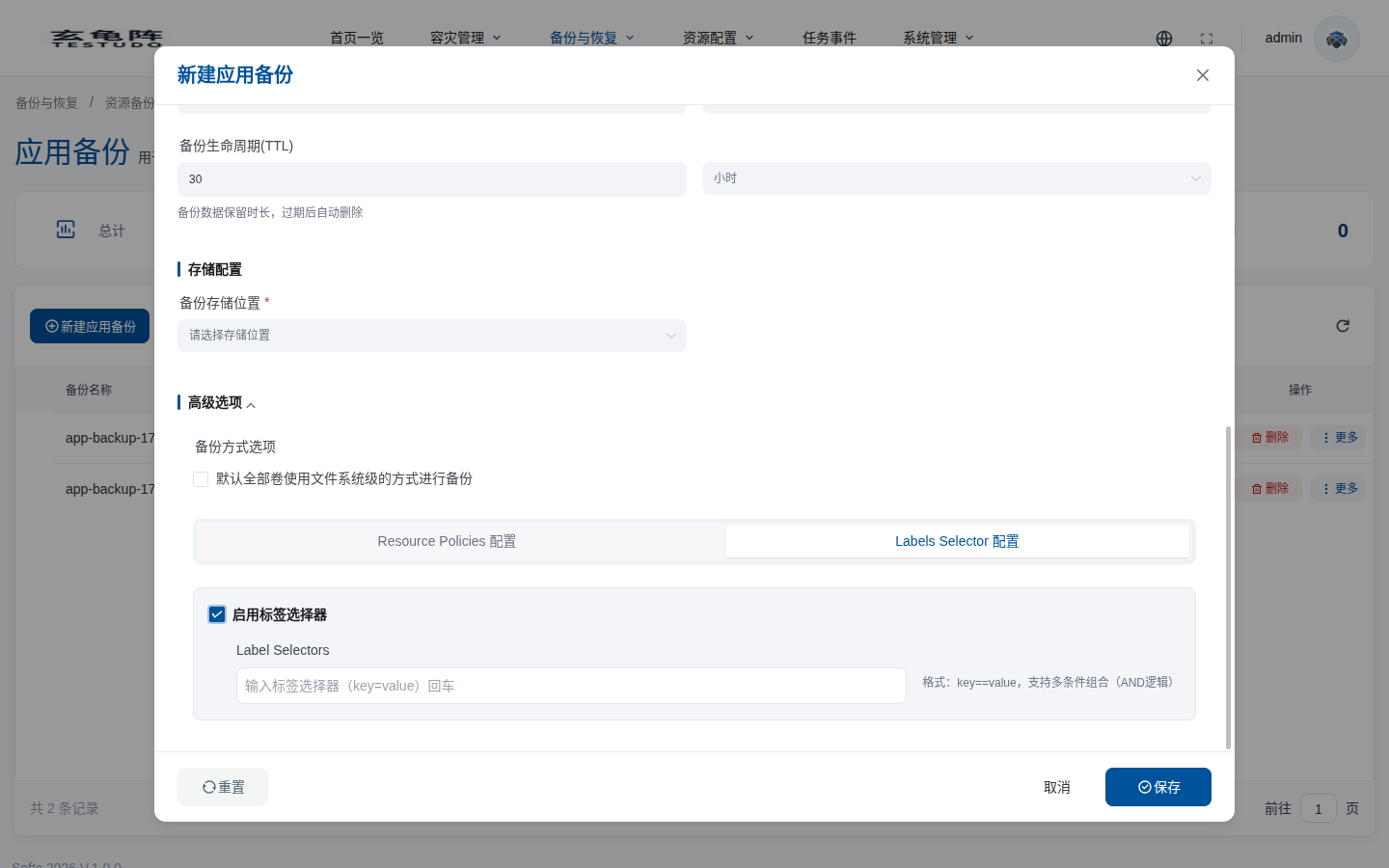
If multiple applications share a namespace, enable label selectors to narrow the backup scope further.
| Option | Meaning | Recommendation |
|---|---|---|
| Enable label selector | Enables label-based resource filtering. | Enable only after you confirm the application labels are complete and consistent. |
| Label Selectors | Enter key=value conditions and press Enter. Multiple conditions are combined with AND logic. | Verify the scope with kubectl get all,pvc,secret,configmap -l key=value before backup. |
| Selector and namespaces | Label selectors further filter only the selected namespaces. | Check PVCs, Services, Secrets, and ConfigMaps, not only Deployments. |
| Selector and resource exclusions | Resource Policies and Labels Selector both narrow the final backup scope. | Inspect Velero Backup details before relying on the restore point. |
CRD Example
apiVersion: testudo.softcdata.com/v1
kind: AppBackup
metadata:
  name: bookinfo-manual
spec:
  cluster: prod-a
  schedule: "@daily"
  template:
    storageLocation: minio-dr
    includedNamespaces:
      - demo-bookinfo
    includedNamespaceScopedResources:
      - deployments.apps
      - statefulsets.apps
      - services
      - configmaps
      - secrets
      - persistentvolumeclaims
    excludedNamespaceScopedResources:
      - events
      - pods
      - replicasets.apps
    includedClusterScopedResources: []
    excludedClusterScopedResources:
      - storageclasses.storage.k8s.io
      - ingressclasses.networking.k8s.io
  paused: false
  skipImmediately: false
The console converts the form into the server DTO and the server writes the CRD. In the server API request these fields are at the top level of the body; in the CRD they are stored under spec.template.
Verify
kubectl get appbackup bookinfo-manual -o yaml
kubectl --context prod-a -n velero get backup